Authored by Dr. Tiziana Ligorio for AI Agents - CSCI 395.32 taught at Hunter College of The City University of New York
Adapted from: Large Language Model Agents, Jerin George Mathew & Jacopo Rossi, Springer 2025
In this tutorial, we build a research assistant that uses multiple agents to streamline the process of finding and filtering academic research papers. This demonstrates a multi-agent system using the LangGraph framework.
The system consists of four specialized agents:
Search Agent — Queries arXiv to find academic papers matching the user’s query
Filter Agent — Evaluates the relevance of retrieved papers and adds relevant ones to the filtered papers list
Query Refinement Agent — Refines the search query to improve results when the current query yields insufficient relevant papers
Supervisor Agent — Decides whether the workflow should finalize (enough relevant papers found) or continue refining the query
Workflow
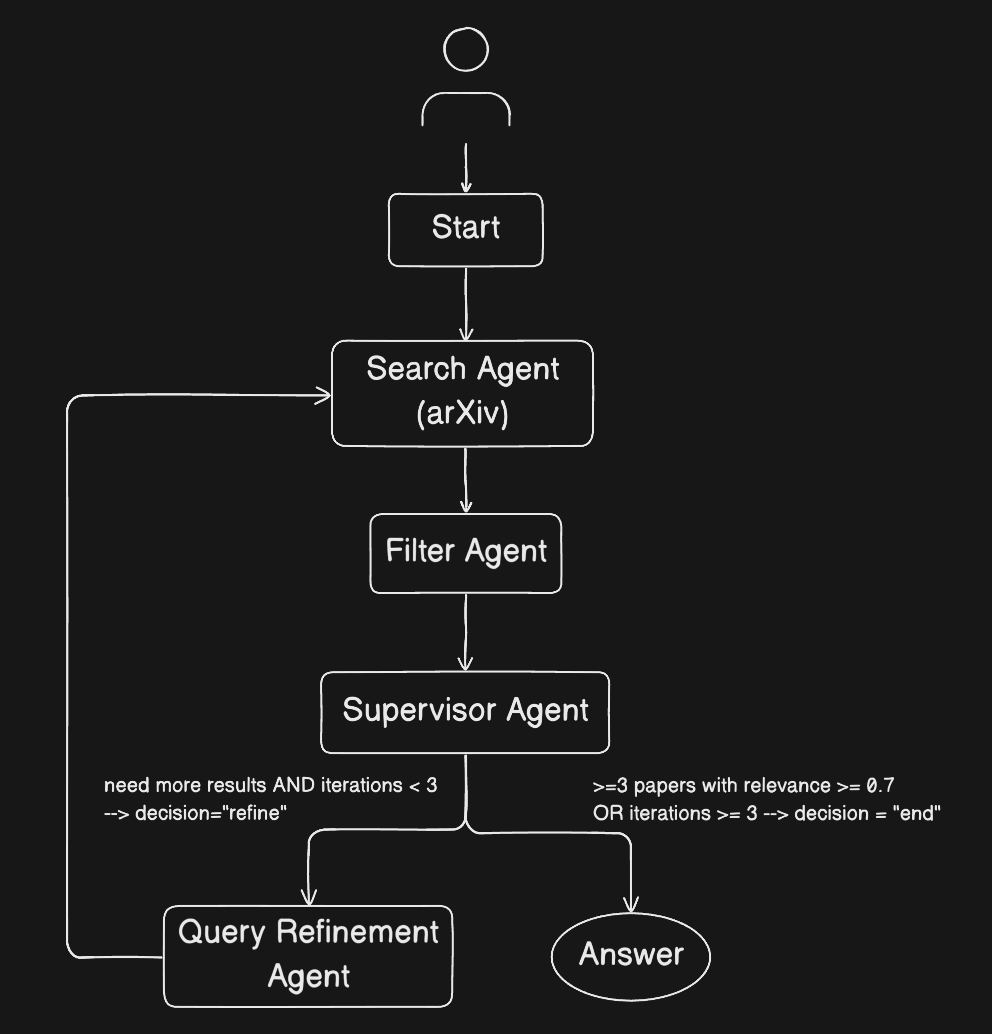
Stopping Criteria
The Supervisor Agent finalizes the workflow when at least 3 papers have been identified with a relevance score ≥ 0.7. Otherwise, the Query Refinement Agent generates an improved query and the search process iterates.
Installs and Imports
%%capture
!pip install langgraph langchain langchain-openai arxiv scholarly python-dotenv
%%capture hides the output
# LangGraph: multi-agent orchestration framework
# Provides StateGraph for defining agent workflows with nodes and edges
from langgraph.graph import StateGraph, START, END

# LangChain: core framework for LLM applications
from langchain_core.messages import HumanMessage, AIMessage, SystemMessage # define roles
from langchain_core.prompts import ChatPromptTemplate

# OpenAI integration for LangChain (used with OpenRouter)
from langchain_openai import ChatOpenAI

# Academic paper search
import arxiv  # arXiv API client

# Standard library
import os
OpenRouter is a unified API that provides access to various LLMs through a single interface. It offers a generous free tier and affordable token usage for minimal cost, making it ideal for learning and experimentation.
If you already pay for other LLM providers or prefer to use a different service, you are welcome to adapt the code accordingly.
Setup your API Key
Step 1 — Get an OpenRouter API key
For this demo we will use an LLM via OpenRouter, which requires an API key.
Go to https://
openrouter .ai Sign in (or create an account if you don’t have one)
Once logged in, navigate to https://
openrouter .ai /settings /keys Click Create Key
Give the key a name, e.g. colab-multiagent_langgraph
Copy the key immediately (you won’t be able to see it again)
Important: Treat this key like a password. Do not share it, paste it into notebooks, or commit it to GitHub.
Step 2 — Add a secret in Colab (UI)
On the left sidebar, click 🔑 Secrets
Add a new secret:
Name: OPENROUTER_API_KEY
Value: your actual API key
Toggle the switch to the left to give notebook access (you should see a checkmark)
If running locally — Add a secret in .env
Create a .env file in the project root:
touch .env
Add the following (replace with your own key):
OPENROUTER_API_KEY=your_openrouter_key_here.
Important: Never paste API keys into code cells.
Load the API Key
In Colab:
Uncomment and run the cell below if you’re using Google Colab.
# # Load API key from Colab Secrets into environment variable if running in Colab
# from google.colab import userdata

# key = "OPENROUTER_API_KEY"
# value = userdata.get(key)
# assert value is not None, f"{key} not found in Colab Secrets or access is disabled"
# os.environ[key] = value

# print("API key successfully loaded")Locally:
from dotenv import load_dotenv

# Load API key from .env if running locally - see local install instructions in the repo README
load_dotenv()True# Sanity check
print("OPENROUTER_API_KEY present:", bool(os.getenv("OPENROUTER_API_KEY")))OPENROUTER_API_KEY present: True
Define the State Schema
In a multi-agent system, the state serves as the shared memory through which agents communicate and coordinate. Each agent reads from and writes to this common structure, enabling them to build on each other’s work without direct interaction.
In LangGraph, the state is a shared data structure that flows through the graph and gets updated by each node. We define it as a TypedDict to specify what fields exist and their types.
When a node returns a dictionary, LangGraph merges it into the current state:
For regular fields, the returned value replaces the existing value
For fields using
Annotatedwith a reducer (likeoperator.add), the returned value is combined with the existing value
This is important for our workflow:
papersgets replaced on each search (we only want the current iteration’s results)filtered_papersaccumulates across iterations (we want to keep all relevant papers found so far)
class AgentState(TypedDict):
    """
    Shared state that flows through the graph and is updated by each node.

    When a node returns {"field": value}, LangGraph merges it into the state:
    - Regular fields: new value REPLACES the old value
    - Annotated fields with reducer: new value is COMBINED with old value using the reducer
    """

    # The current search query, replaced when Query Refinement Agent updates it
    query: str

    # Raw search results from the current iteration, replaced on each search
    # (we only need the latest batch to filter)
    papers: List[dict]

    # Papers that passed relevance filtering, ACCUMULATES across iterations
    # Using operator.add as reducer means new papers are appended, not replaced
    filtered_papers: Annotated[List[dict], operator.add]

    # All evaluations from the Filter Agent (for debugging/inspection)
    # Each entry contains: title, score, justification - regardless of whether it passed
    #
    # We use a custom "replace" reducer (lambda old, new: new) instead of operator.add because:
    # 1. LangGraph requires Annotated fields for proper state tracking between nodes
    # 2. But we only need the CURRENT iteration's evaluations for query refinement context
    # 3. Accumulating all evaluations across iterations would waste memory/tokens
    # The lambda simply returns the new value, effectively replacing instead of appending
    all_evaluations: Annotated[List[dict], lambda old, new: new]

    # Tracks how many search iterations we've done (to prevent excessively long iterations or infinite loops)
    iteration: int

    # Decision from the Supervisor Agent: "end" or "refine"
    decision: str
# Initialize a test state that we can pass to agent functions for testing
# This lets us test each agent independently before wiring them into the graph
test_state: AgentState = {
"query": "multi-agent reinforcement learning", # The research topic to search for
"papers": [], # Will be populated by search_agent
"filtered_papers": [], # Will be populated by filter_agent
"all_evaluations": [], # Will store all LLM evaluations for debugging
"iteration": 0, # Starting iteration
"decision": "" # Will be set by supervisor_agent
}
print("Test state initialized:")
print(f" query: '{test_state['query']}'")
print(f" papers: {len(test_state['papers'])} items")
print(f" filtered_papers: {len(test_state['filtered_papers'])} items")
print(f" all_evaluations: {len(test_state['all_evaluations'])} items")
print(f" iteration: {test_state['iteration']}")
print(f" decision: '{test_state['decision']}'")Define the Agents
Search Agent
The Search Agent is responsible for querying academic paper databases to find papers matching the user’s research query. It uses the arXiv API to search for papers and returns structured metadata for each result.
Input: Takes the current query from the state
Output: Returns a list of papers with metadata (title, authors, abstract, URL, publication date)
Tools: arXiv API client
The agent does not use an LLM — it’s a straightforward API call that retrieves papers based on keyword matching. The LLM-based reasoning happens in the Filter Agent, which evaluates relevance.
# Create a single arXiv client to reuse across all searches
# This ensures proper rate limiting (the client tracks request timestamps internally)
arxiv_client = arxiv.Client()

def search_agent(state: dict) -> dict:
    """
    Search for academic papers on arXiv based on the current query.

    Args:
        state: Current graph state containing 'query'

    Returns:
        Updated state with 'papers' list containing search results
    """
    query = state["query"]
    max_results = 10

    # Search arXiv using the shared client (handles rate limiting internally)
    search = arxiv.Search(
        query=query,
        max_results=max_results,
        sort_by=arxiv.SortCriterion.Relevance
    )

    papers = []
    for result in arxiv_client.results(search):
        paper = {
            "title": result.title,
            "authors": [author.name for author in result.authors],
            "abstract": result.summary,
            "url": result.entry_id,
            "published": result.published.strftime("%Y-%m-%d"),
            "source": "arxiv"
        }
        papers.append(paper)

    print(f"Search Agent: Found {len(papers)} papers for query '{query}'")

    return {"papers": papers}
papers = search_agent(test_state)["papers"]
len(papers)Search Agent: Found 10 papers for query 'multi-llm-agent reinforcement learning'
10titles = [paper["title"] for paper in papers]
dates = [paper["published"] for paper in papers]
for title, date in zip(titles, dates):
print(f"{date}: {title}") 2024-09-27: ARLBench: Flexible and Efficient Benchmarking for Hyperparameter Optimization in Reinforcement Learning
2025-06-24: Causal-Paced Deep Reinforcement Learning
2018-07-13: Exploring Hierarchy-Aware Inverse Reinforcement Learning
2024-01-14: Small LLMs Are Weak Tool Learners: A Multi-LLM Agent
2023-01-19: A Tutorial on Meta-Reinforcement Learning
2018-09-25: Anderson Acceleration for Reinforcement Learning
2024-06-07: Stabilizing Extreme Q-learning by Maclaurin Expansion
2019-09-26: MERL: Multi-Head Reinforcement Learning
2025-08-09: Context Engineering for Multi-Agent LLM Code Assistants Using Elicit, NotebookLM, ChatGPT, and Claude Code
2019-04-20: Compression and Localization in Reinforcement Learning for ATARI Games
# add papers to test_state for testing
test_state["papers"] = papers
len(test_state["papers"])10Filter Agent
The Filter Agent evaluates the relevance of each paper retrieved by the Search Agent. Unlike the Search Agent, this agent uses an LLM to reason about semantic relevance — determining whether a paper’s content actually addresses the user’s research question, not just whether it contains matching keywords.
Input: Takes papers (raw search results) and query from the state
Output: Returns papers that score ≥ 0.7 relevance, each with a relevance_score field added
LLM: Uses gpt-4o-mini via OpenRouter for cost-effective reasoning
The agent prompts the LLM to return a JSON object with a relevance score (0.0–1.0) and justification for each paper. Only papers meeting the threshold are added to filtered_papers.
import json

# Initialize the LLM for agents that need reasoning capabilities
llm = ChatOpenAI(
    model="openai/gpt-4o-mini",
    temperature=0,  # Deterministic output for consistent evaluations
    openai_api_base="https://openrouter.ai/api/v1",
    openai_api_key=os.getenv("OPENROUTER_API_KEY")
)

def filter_agent(state: dict) -> dict:
    """
    Evaluate the relevance of each paper to the research query using an LLM.

    Args:
        state: Current graph state containing 'query' and 'papers'

    Returns:
        Updated state with:
        - 'filtered_papers': papers that scored >= 0.7
        - 'all_evaluations': all papers with their scores and justifications (for debugging)
    """
    query = state["query"]
    papers = state["papers"]

    # SystemMessage: Defines the AI's role, behavior, and output format
    # These are persistent instructions that apply to ALL evaluations
    system_prompt = SystemMessage(content="""You are an academic paper relevance evaluator.
Your task is to assess how relevant a given paper is to a research query.
Be objective and base your assessment on the paper's title, abstract, and publication date.

When evaluating relevance, consider:
- How directly the paper addresses the research query
- The recency of the paper (more recent papers are preferred when content relevance is similar)

You must respond with ONLY a valid JSON object in this exact format:
{"relevance_score": 0.0, "justification": "brief explanation"}

The relevance_score must be between 0.0 and 1.0 where:
- 0.0-0.3: Not relevant (paper does not address the research query)
- 0.4-0.6: Somewhat relevant (paper touches on related topics)
- 0.7-1.0: Highly relevant (paper directly addresses the research query)""")

    filtered = []
    all_evaluations = []  # Track ALL evaluations for debugging

    for paper in papers:
        # HumanMessage: Contains ONLY the variable data for this specific evaluation
        # No instructions here - just the inputs that change per paper
        user_prompt = HumanMessage(content=f"""Research Query: {query}

Paper Title: {paper['title']}

Publication Date: {paper['published']}

Abstract: {paper['abstract']}""")

        try:
            # Pass both SystemMessage and HumanMessage to the LLM
            # SystemMessage sets the behavior, HumanMessage provides the specific data
            response = llm.invoke([system_prompt, user_prompt])
            result = json.loads(response.content)

            score = result.get("relevance_score", 0)
            justification = result.get("justification", "")

            # Record this evaluation (regardless of whether it passes)
            evaluation = {
                "title": paper["title"],
                "published": paper["published"],
                "relevance_score": score,
                "justification": justification,
                "passed": score >= 0.7
            }
            all_evaluations.append(evaluation)

            # Keep papers that meet the relevance threshold
            if score >= 0.7:
                paper_with_score = paper.copy()
                paper_with_score["relevance_score"] = score
                paper_with_score["justification"] = justification
                filtered.append(paper_with_score)

        except (json.JSONDecodeError, Exception) as e:
            # If parsing fails, record the error and skip this paper
            all_evaluations.append({
                "title": paper["title"],
                "published": paper["published"],
                "relevance_score": None,
                "justification": f"Error: {e}",
                "passed": False
            })
            print(f"Filter Agent: Error evaluating '{paper['title'][:50]}...': {e}")
            continue

    print(f"Filter Agent: {len(filtered)}/{len(papers)} papers passed relevance threshold (>= 0.7)")

    # Return both filtered papers and all evaluations
    return {
        "filtered_papers": filtered,
        "all_evaluations": all_evaluations
    }
filter_results = filter_agent(test_state)Filter Agent: 1/10 papers passed relevance threshold (>= 0.7)
len(filter_results["filtered_papers"])1filter_results["filtered_papers"][0]["title"]'Small LLMs Are Weak Tool Learners: A Multi-LLM Agent'len(filter_results["all_evaluations"])10for paper in filter_results["all_evaluations"]:
print(paper["title"], paper["relevance_score"], paper["justification"]) ARLBench: Flexible and Efficient Benchmarking for Hyperparameter Optimization in Reinforcement Learning 0.4 The paper discusses hyperparameter optimization in reinforcement learning, which is related to the broader topic of reinforcement learning but does not specifically address multi-LLM-agent reinforcement learning.
Causal-Paced Deep Reinforcement Learning 0.4 The paper discusses reinforcement learning and curriculum learning, which are related to multi-agent reinforcement learning, but it does not specifically address multi-LLM agents or their integration.
Exploring Hierarchy-Aware Inverse Reinforcement Learning 0.4 The paper discusses inverse reinforcement learning and hierarchical strategies, which are related to reinforcement learning concepts, but it does not specifically address multi-LLM-agent systems.
Small LLMs Are Weak Tool Learners: A Multi-LLM Agent 0.8 The paper discusses a multi-LLM agent framework that addresses tool learning, which is relevant to multi-LLM-agent reinforcement learning, particularly in the context of task planning and execution.
A Tutorial on Meta-Reinforcement Learning 0.4 The paper discusses meta-reinforcement learning, which is related to reinforcement learning but does not specifically address multi-LLM-agent systems.
Anderson Acceleration for Reinforcement Learning 0.4 The paper discusses reinforcement learning and introduces a method that could be applied to it, but it does not specifically address multi-LLM-agent reinforcement learning.
Stabilizing Extreme Q-learning by Maclaurin Expansion 0.4 The paper discusses reinforcement learning and introduces a method related to Q-learning, which is relevant to the broader topic of multi-agent reinforcement learning, but it does not specifically address multi-LLM agents or their integration.
MERL: Multi-Head Reinforcement Learning 0.4 The paper discusses reinforcement learning and introduces a framework (MERL) that could relate to multi-agent systems, but it does not specifically address multi-LLM-agent reinforcement learning, making it only somewhat relevant.
Context Engineering for Multi-Agent LLM Code Assistants Using Elicit, NotebookLM, ChatGPT, and Claude Code 0.6 The paper discusses multi-agent systems involving LLMs and their application in code generation, which relates to multi-LLM-agent reinforcement learning, but it does not explicitly focus on reinforcement learning aspects.
Compression and Localization in Reinforcement Learning for ATARI Games 0.3 The paper discusses reinforcement learning and model compression, but it does not specifically address multi-LLM-agent reinforcement learning, making it only tangentially relevant.
# Configuration constants for the Supervisor's decision logic
MIN_RELEVANT_PAPERS = 3  # Minimum papers needed to consider search successful
MAX_ITERATIONS = 3       # Maximum search attempts before giving up
Supervisor Agent
The Supervisor Agent is the decision-maker that controls the workflow. After the Filter Agent evaluates papers, the Supervisor checks whether we have enough relevant results or need to refine the query and search again.
Input: Takes filtered_papers and iteration from the state
Output: Returns a decision field: either "end" or "refine"
No LLM required, this is pure conditional logic, not reasoning.
Decision Logic:
If
filtered_papershas ≥3 papers →"end"(success)If
iteration≥ 3 →"end"(max attempts reached, return what we have)Otherwise →
"refine"(try again with a refined query)
def supervisor_agent(state: dict) -> dict:
    """
    Decide whether to end the workflow or continue with query refinement.

    This agent uses simple conditional logic (no LLM) to make routing decisions
    based on the current state of the search.

    Args:
        state: Current graph state containing 'filtered_papers' and 'iteration'

    Returns:
        Updated state with 'decision' field: "end" or "refine"
    """
    filtered_papers = state["filtered_papers"]
    iteration = state["iteration"]

    num_relevant = len(filtered_papers)
    stop_reason = ""

    # Decision logic
    if num_relevant >= MIN_RELEVANT_PAPERS:
        # Success: we have enough relevant papers
        decision = "end"
        stop_reason = f"Success: Found {num_relevant} relevant papers (>= {MIN_RELEVANT_PAPERS} required)"
    elif iteration >= MAX_ITERATIONS:
        # Max attempts reached: return what we have
        decision = "end"
        stop_reason = f"Max iterations ({MAX_ITERATIONS}) reached with only {num_relevant} relevant papers"
    else:
        # Need more results: refine query and try again
        decision = "refine"

    print(f"Supervisor Agent: {decision.upper()}" + (f" - {stop_reason}" if stop_reason else f" - Refining query (iteration {iteration + 1})"))

    return {"decision": decision}
Query Refinement Agent
The Query Refinement Agent improves the search query when the current results are insufficient. It uses an LLM to reason about why the previous query didn’t yield enough relevant papers and how to improve it.
Input: Takes query, all_evaluations, and iteration from the state
Output: Returns an updated query string and increments iteration
LLM: Uses gpt-4o-mini via OpenRouter to analyze feedback and generate better queries
The agent examines the evaluation feedback (why papers were rejected) and uses that insight to craft a more targeted query. For example, if many papers were rejected for being too theoretical, it might add terms like “applied” or “practical”.
def query_refinement_agent(state: dict) -> dict:
    """
    Refine the search query based on feedback from previous evaluations.

    Analyzes why papers were rejected and generates an improved query
    that is more likely to find relevant results.

    Args:
        state: Current graph state containing 'query', 'all_evaluations', and 'iteration'

    Returns:
        Updated state with:
        - 'query': refined search query
        - 'iteration': incremented iteration count
    """
    current_query = state["query"]
    all_evaluations = state["all_evaluations"]
    iteration = state["iteration"]

    # Format evaluation feedback for the LLM
    feedback_lines = []
    for eval in all_evaluations:
        status = "PASSED" if eval["passed"] else "REJECTED"
        feedback_lines.append(
            f"- [{status}] \"{eval['title']}\" (score: {eval['relevance_score']}) - {eval['justification']}"
        )
    feedback_summary = "\n".join(feedback_lines)

    # SystemMessage: Defines the AI's role and output format
    system_prompt = SystemMessage(content="""You are a search query optimization expert.
    Your task is to refine academic search queries based on feedback from previous search results.

    Analyze why papers were rejected and craft a more targeted query that will find more relevant results.
    Consider:
    - Adding specific technical terms that were missing
    - Removing overly broad or ambiguous terms
    - Including synonyms or related concepts
    - Narrowing the scope if results were too general

    You must respond with ONLY the refined query string, nothing else.
    Do not include quotes around the query. Just output the query text directly.""")

    # HumanMessage: Contains the specific data for this refinement
    user_prompt = HumanMessage(content=f"""Current Query: {current_query}

    Iteration: {iteration + 1}

    Previous Search Results Feedback:
    {feedback_summary}

    Based on this feedback, generate an improved search query that will find more relevant papers.""")

    try:
        response = llm.invoke([system_prompt, user_prompt])
        refined_query = response.content.strip()

        # Clean up the query (remove quotes if LLM added them)
        refined_query = refined_query.strip('"\'')

        print(f"Query Refinement Agent: '{current_query}' → '{refined_query}'")

    except Exception as e:
        # If refinement fails, add "survey" to find overview papers
        refined_query = f"{current_query} survey"
        print(f"Query Refinement Agent: Error ({e}), using fallback: '{refined_query}'")

    return {
        "query": refined_query,
        "iteration": iteration + 1
    }
# Test the Query Refinement Agent
# The test_state already has all_evaluations from the filter agent test
print(f"Current state before refinement:")
print(f" query: '{test_state['query']}'")
print(f" iteration: {test_state['iteration']}")
print(f" all_evaluations: {len(test_state['all_evaluations'])} items")
print()
# Test query refinement agent
refinement_result = query_refinement_agent(test_state)
print()
print(f"Refinement result:")
print(f" new query: '{refinement_result['query']}'")
print(f" new iteration: {refinement_result['iteration']}")Current state before refinement:
query: 'multi-llm-agent reinforcement learning'
iteration: 0
all_evaluations: 10 items
Query Refinement Agent: 'multi-llm-agent reinforcement learning' → 'multi-llm-agent reinforcement learning framework tool learning task planning execution'
Refinement result:
new query: 'multi-llm-agent reinforcement learning framework tool learning task planning execution'
new iteration: 1
Build the Graph
Now that we have all four agents defined, we wire them together into a LangGraph StateGraph. The graph defines:
Nodes — Each agent function becomes a node in the graph
Edges — Define the flow between nodes (which agent runs after which)
Conditional Edges — Allow dynamic routing based on state (the Supervisor’s decision)
Recall, the workflow follows this pattern:
# Create the StateGraph with our state schema
graph = StateGraph(AgentState)

# Add nodes — each agent function becomes a node
graph.add_node("search_agent", search_agent)
graph.add_node("filter_agent", filter_agent)
graph.add_node("supervisor_agent", supervisor_agent)
graph.add_node("query_refinement_agent", query_refinement_agent)

# Add edges — define the linear flow
graph.add_edge(START, "search_agent")           # Entry point
graph.add_edge("search_agent", "filter_agent")  # Search → Filter
graph.add_edge("filter_agent", "supervisor_agent")  # Filter → Supervisor

# Add conditional edge — Supervisor decides next step based on 'decision' field
def route_supervisor(state: dict) -> str:
    """Route based on supervisor's decision."""
    if state["decision"] == "end":
        return END
    else:
        return "query_refinement_agent"

graph.add_conditional_edges(
    "supervisor_agent",
    route_supervisor,
    {END: END, "query_refinement_agent": "query_refinement_agent"}
)

# Query refinement loops back to search
graph.add_edge("query_refinement_agent", "search_agent")

# Compile the graph into a runnable workflow
workflow = graph.compile()

print("Graph compiled successfully!")
Graph compiled successfully!
Run the Workflow
Now we can run the complete workflow by invoking the compiled graph with an initial state. The graph will:
Start with the search agent
Filter results for relevance
Check if we have enough papers (Supervisor)
If not, refine the query and repeat
Continue until we have ≥3 relevant papers or hit the max iteration limit
# Define the initial state with our research query
initial_state = {
    "query": "multi-llm-agent reinforcement learning",
    "papers": [],
    "filtered_papers": [],
    "all_evaluations": [],
    "iteration": 0,
    "decision": ""
}

print(f"Starting workflow with query: '{initial_state['query']}'")
print("=" * 60)

# Run the workflow
final_state = workflow.invoke(initial_state)

print("=" * 60)
print(f"\nWorkflow complete!")

# Determine stop reason from final state values
num_found = len(final_state['filtered_papers'])
if num_found >= MIN_RELEVANT_PAPERS:
    stop_reason = f"Success: Found {num_found} relevant papers"
else:
    stop_reason = f"Max iterations reached with only {num_found} relevant papers"

print(f"Result: {stop_reason}")
print(f"Final query: '{final_state['query']}'")
print(f"Total iterations: {final_state['iteration']}")
print(f"Relevant papers found: {num_found}")
Starting workflow with query: 'multi-llm-agent reinforcement learning'
============================================================
Search Agent: Found 10 papers for query 'multi-llm-agent reinforcement learning'
Filter Agent: 1/10 papers passed relevance threshold (>= 0.7)
Supervisor Agent: REFINE - Refining query (iteration 1)
Query Refinement Agent: 'multi-llm-agent reinforcement learning' → 'multi-llm-agent reinforcement learning collaboration tool learning'
Search Agent: Found 10 papers for query 'multi-llm-agent reinforcement learning collaboration tool learning'
Filter Agent: 0/10 papers passed relevance threshold (>= 0.7)
Supervisor Agent: REFINE - Refining query (iteration 2)
Query Refinement Agent: 'multi-llm-agent reinforcement learning collaboration tool learning' → 'multi-agent reinforcement learning collaboration tools for large language models'
Search Agent: Found 10 papers for query 'multi-agent reinforcement learning collaboration tools for large language models'
Filter Agent: 3/10 papers passed relevance threshold (>= 0.7)
Supervisor Agent: END - Success: Found 4 relevant papers (>= 3 required)
============================================================
Workflow complete!
Result: Success: Found 4 relevant papers
Final query: 'multi-agent reinforcement learning collaboration tools for large language models'
Total iterations: 2
Relevant papers found: 4
# Display the relevant papers found
print("Relevant Papers Found:")
print("-" * 60)

for i, paper in enumerate(final_state["filtered_papers"], 1):
    print(f"\n{i}. {paper['title']}")
    print(f"   Published: {paper['published']}")
    print(f"   Relevance: {paper['relevance_score']}")
    print(f"   URL: {paper['url']}")
Relevant Papers Found:
------------------------------------------------------------
1. Small LLMs Are Weak Tool Learners: A Multi-LLM Agent
Published: 2024-01-14
Relevance: 0.8
URL: http://arxiv.org/abs/2401.07324v3
2. Reinforcement Learning Meets Large Language Models: A Survey of Advancements and Applications Across the LLM Lifecycle
Published: 2025-09-20
Relevance: 0.7
URL: http://arxiv.org/abs/2509.16679v1
3. Hierarchical Multi-agent Large Language Model Reasoning for Autonomous Functional Materials Discovery
Published: 2025-12-15
Relevance: 0.7
URL: http://arxiv.org/abs/2512.13930v1
4. Towards Effective GenAI Multi-Agent Collaboration: Design and Evaluation for Enterprise Applications
Published: 2024-12-06
Relevance: 0.8
URL: http://arxiv.org/abs/2412.05449v1
Some Suggestions for Improvements
Duplicate papers — Papers may appear more than once in the final results. This happens because
filtered_papersaccumulates across iterations — if the same paper is found in multiple searches and passes the relevance threshold each time, it gets added again.Exercise for the reader: Modify the workflow to prevent duplicate papers. Consider deduplicating by paper URL or title in the
filter_agent, keeping track of already-seen paper IDs in the state, or deduplicating at the end before displaying results.Multiple search sources — More search agents may be added to use different academic paper sources: Semantic Scholar, PubMed, OpenAlex, CrossRef, IEEE Xplore, ACM Digital Library, and others.
Exercise for the reader: Implement additional agents for different searches (e.g.,
semantic_scholar_agent,pubmed_agent, etc.) and modify the graph to run multiple search agents in parallel. Consider how the state schema should change, whether the filter agent should treat sources differently, and how to handle cross-database duplicates. Should all sources always be searched? What logic determines which sources to use — the research domain, the query keywords, the iteration number? Or should an LLM agent decide?Error handling and retries — The workflow currently assumes API calls succeed. What happens if arXiv is down, rate limits us mid-workflow, or returns malformed data?
Exercise for the reader: Add try/except blocks and graceful degradation so the workflow can recover from transient failures.
Citation following — Once relevant papers are found, expanding the search to include papers they cite (references) or papers that cite them (citations) could surface important related work.
Exercise for the reader: Implement a
citation_agentthat takes the filtered papers and queries a citation API (e.g., Semantic Scholar) to find connected papers. How should this agent integrate into the existing graph?Summarization agent — After finding relevant papers, a summarization step could help users quickly understand the landscape.
Exercise for the reader: Add a final agent that synthesizes the findings: generate a research summary, identify common themes across papers, or produce a literature review outline.
User feedback loop — The current workflow is fully automated. Allowing user input during execution could improve results.
Exercise for the reader: Modify the workflow to pause and ask the user to mark papers as relevant or irrelevant. Use this feedback to adjust subsequent searches or filter criteria.
Export functionality — Researchers need results in formats compatible with their tools.
Exercise for the reader: Add an export step that outputs results to BibTeX for LaTeX, CSV for spreadsheets.
Checkpointing — Long-running workflows may be interrupted. LangGraph supports persistence and checkpointing.
Exercise for the reader: Configure the workflow to save state periodically so it can be resumed if interrupted. See the LangGraph documentation on persistence.