Authored by Dr. Tiziana Ligorio for AI Agents - CSCI 395.32 taught at Hunter College of The City University of New York
In this tutorial we build a tool-using ReAct agent. The agent alternates between reasoning (deciding what to do next) and acting (calling a tool), and it reads each tool result before deciding again.
We first look under the hood at a minimal ReAct loop written by hand, so that nothing is hidden. Then we build the agent with a framework, the way practitioners usually do. We will use LangChain’s create_agent, and see how much of the loop the framework handles for us. Finally, we evaluate the agent and improve it.
By the end of this tutorial you will be able to:
Explain what a ReAct loop does, step by step, and what a minimal loop leaves out.
Build a tool-using agent with LangChain and identify the harness around the model: the loop, the tools, the context, and the guardrails.
Connect tools through MCP, both from a server you write and from an existing one.
Evaluate the agent on a small evaluation test set (end-to-end), read its traces to find where it fails, and improve one component at a time (component-level).
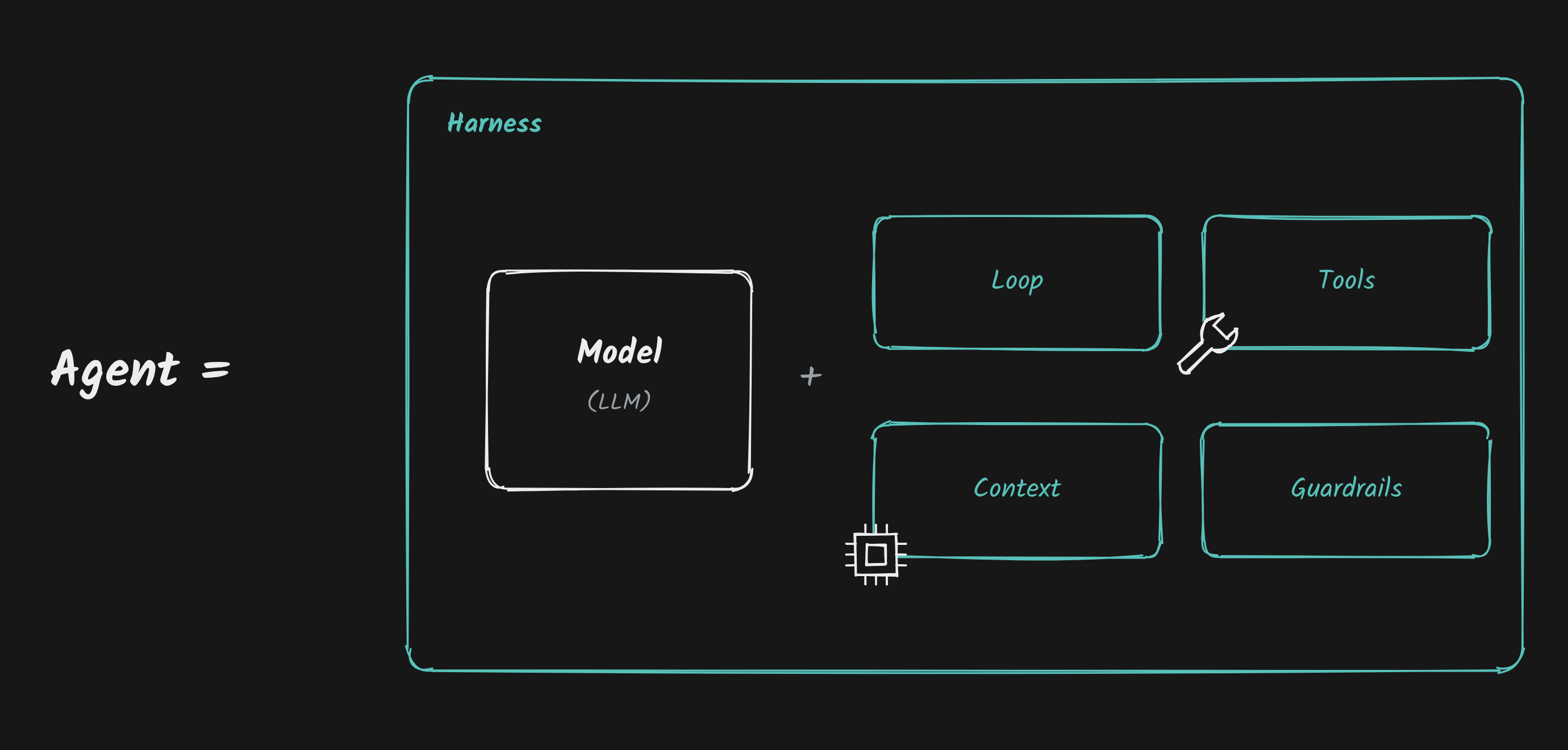
This tutorial follows the ReAct and Evals lectures.
What we will build: the Riverview Course Helper
Riverview College is a fictional school (it does not describe Hunter College or CUNY). We will build a small Course Helper that answers student questions about the course catalog and the Fall 2026 academic calendar, such as:
“What do I need to take before CSCI 310?”
“How many weeks are there between the first day of classes and the withdrawal deadline?”
“If I get an A in CSCI 210 and a B+ in MATH 220, what is my GPA for those two courses?”
The data is small and fixed on purpose. Because every question has a known correct answer, we can check whether the agent got it right, which is exactly what we need for the evaluation part of this tutorial.
Sections
Installs and imports
Setup your API key
The Riverview data and tools
Under the hood: a ReAct loop by hand
Build the agent with LangChain
Tools through MCP
Evaluate the agent
Iterate: change one thing, measure again
Optional: tracing and evals with LangSmith
Reflect and your turn
1. Installs and Imports
%%capture
!pip install langchain langchain-openai langchain-mcp-adapters mcp openai python-dotenv uv
%%capture hides the pip install output to keep the notebook clean. We also install uv, which provides the uvx command used to launch an MCP server in Section 6. If you are running locally, uv sync installs the same packages from pyproject.toml (see SETUP.md).
# Standard library
import os
import ast
import json
import operator
from datetime import date

# Framework packages (OpenAI SDK, LangChain, MCP) are imported in the
# sections where we first use them, so you can see what each part needs.
2. Setup your API Key
Step 1 — Get an OpenRouter API key
OpenRouter provides access to models from different vendors through one API. This is the only key the core tutorial needs.
Go to https://
openrouter .ai Sign in (or create an account if you don’t have one)
Once logged in, navigate to https://
openrouter .ai /settings /keys Click Create Key
Give the key a name, e.g.
colab-react-agentCopy the key immediately (you won’t be able to see it again)
Important: Treat this key like a password. Do not share it, paste it into notebooks, or commit it to GitHub.
Step 2 — Store your API key
If running in Google Colab
On the left sidebar, click 🔑 Secrets.
Add a new secret named
OPENROUTER_API_KEYwith your key as the value.Toggle the switch to give the notebook access to the secret.
If running locally
Create a .env file in the project folder containing:
OPENROUTER_API_KEY=your_openrouter_key_hereMake sure .env is listed in .gitignore.
Load the API Key
In Colab:
Uncomment and run the cell below if you’re using Google Colab.
# Uncomment the lines below if running in Google Colab
# from google.colab import userdata
# os.environ["OPENROUTER_API_KEY"] = userdata.get("OPENROUTER_API_KEY")
# print("API key loaded from Colab Secrets")Locally:
Run the cell below if you’re running locally with a .env file.
# Load the API key from .env file if running locally
from dotenv import load_dotenv
load_dotenv()
print("Environment loaded from .env file")
Environment loaded from .env file
# Check that the key is available (without printing it)
if not os.getenv("OPENROUTER_API_KEY"):
    raise RuntimeError(
        "Missing OPENROUTER_API_KEY. Check Colab Secrets or your local .env file."
    )
print("OPENROUTER_API_KEY is available.")
OPENROUTER_API_KEY is available.
Choose the model
We use openai/gpt-4.1-mini through OpenRouter: a small, inexpensive model that is reliable at tool calling.
We set the temperature to 0. Temperature controls how much randomness the model uses when choosing its next words. At 0 the model almost always makes the same choices for the same input. That matters twice in this tutorial: when debugging, we want to reproduce a behavior, and when evaluating, we want a score to reflect our changes rather than chance. (Even at temperature 0, outputs can occasionally vary slightly, which is one reason evaluations use several test cases rather than one.)
OPENROUTER_BASE_URL = "https://openrouter.ai/api/v1"
MODEL = "openai/gpt-4.1-mini"
TEMPERATURE = 0

print(f"Model: {MODEL} (temperature {TEMPERATURE})")
Model: openai/gpt-4.1-mini (temperature 0)
3. The Riverview Data and Tools
A tool is just a function the agent can run. Before any agent exists, we write the tools as plain Python functions and test them directly. This is good practice: if a tool is wrong, no amount of prompting will make the agent right.
Our Course Helper will have four tools:
| Tool | What it does |
|---|---|
get_course_info(course_code) | Looks up a course in the catalog: title, credits, prerequisites |
get_academic_date(event) | Looks up a date in the Fall 2026 academic calendar |
days_between(start_date, end_date) | Counts the days between two dates |
calculator(expression) | Evaluates an arithmetic expression safely |
Later, in Section 6, the agent will also get today’s date from an MCP server.
First, the data. In a real system these would be calls to the college’s catalog and calendar services. Here they are small Python dictionaries, so every answer is known in advance. This is a good way to start prototyping: to evaluate a system on a small, well known set of data to inspect behavior before connecting to the full database.
# Riverview College course catalog (fictional)
COURSE_CATALOG = {
    "CSCI 110": {"title": "Programming Fundamentals", "credits": 4, "prerequisites": []},
    "CSCI 210": {"title": "Data Structures", "credits": 4, "prerequisites": ["CSCI 110"]},
    "CSCI 310": {"title": "Algorithms", "credits": 3, "prerequisites": ["CSCI 210", "MATH 220"]},
    "MATH 120": {"title": "Calculus I", "credits": 4, "prerequisites": []},
    "MATH 220": {"title": "Discrete Mathematics", "credits": 3, "prerequisites": ["MATH 120"]},
    "STAT 205": {"title": "Introductory Statistics", "credits": 3, "prerequisites": []},
    "ENG 101": {"title": "College Writing", "credits": 3, "prerequisites": []},
}

# Riverview College Fall 2026 academic calendar (fictional)
ACADEMIC_CALENDAR = {
    "first_day_of_classes": {"date": "2026-08-26", "note": "Fall courses begin."},
    "add_drop_deadline": {"date": "2026-09-02", "note": "Last day to add or drop through self-service, 11:59 p.m. Eastern."},
    "late_add_deadline": {"date": "2026-09-09", "note": "Last day to request a late add (requires instructor and chair approval)."},
    "withdrawal_deadline": {"date": "2026-11-06", "note": "Last day to withdraw from an individual course, 5:00 p.m. Eastern. A withdrawal produces a W grade."},
    "last_day_of_classes": {"date": "2026-12-08", "note": "Final examinations follow."},
    "end_of_term": {"date": "2026-12-15", "note": "Fall 2026 concludes."},
}

# Grade points used to compute a GPA
GRADE_POINTS = {
    "A": 4.0, "A-": 3.7, "B+": 3.3, "B": 3.0, "B-": 2.7,
    "C+": 2.3, "C": 2.0, "C-": 1.7, "D": 1.0, "F": 0.0,
}

print(f"{len(COURSE_CATALOG)} courses, {len(ACADEMIC_CALENDAR)} calendar events")
7 courses, 6 calendar events
Tool 1: get_course_info
Students type course codes in many ways (csci310, CSCI 310, Csci 310), so the tool normalizes the code first.
Notice what happens when the course does not exist: the tool returns an error message instead of crashing. The model reads tool results, so a clear message such as “No course CSCI 999 in the catalog” lets it recover, for example by telling the student it could not find the course.
We also simulate something every real service does from time to time: a temporary outage. The first lookup of STAT 205 raises a timeout; the next one succeeds. We will use this later to see how the harness can retry a failed tool call.
import re

# Simulated temporary outage: the first lookup of these courses times out
SIMULATED_TIMEOUTS = {"STAT 205"}
_timeouts_remaining = set(SIMULATED_TIMEOUTS)

def reset_simulated_failures():
    # Restore the simulated outage (useful before re-running a test)
    global _timeouts_remaining
    _timeouts_remaining = set(SIMULATED_TIMEOUTS)

def normalize_course_code(course_code: str) -> str:
    # 'csci310', 'CSCI 310', 'Csci  310' -> 'CSCI 310'
    match = re.fullmatch(r"\s*([A-Za-z]+)\s*(\d+)\s*", course_code)
    if not match:
        return course_code.strip().upper()
    return f"{match.group(1).upper()} {match.group(2)}"

def get_course_info(course_code: str) -> dict:
    code = normalize_course_code(course_code)

    # Expected problem -> return a message the model can act on
    if code not in COURSE_CATALOG:
        return {"error": f"No course {code} in the Riverview catalog."}

    # Unexpected, temporary problem -> raise; the harness decides whether to retry
    if code in _timeouts_remaining:
        _timeouts_remaining.discard(code)
        raise TimeoutError("The Riverview catalog service timed out. Please try again.")

    return {"course_code": code, **COURSE_CATALOG[code]}

get_course_info("csci310")
{'course_code': 'CSCI 310',
'title': 'Algorithms',
'credits': 3,
'prerequisites': ['CSCI 210', 'MATH 220']}Tool 2: get_academic_date
The tool accepts only the event names in the calendar. Restricting the input to a fixed list of values makes the tool easier for the model to use correctly, and we will state that list in the tool’s description.
def get_academic_date(event: str) -> dict:
    key = event.strip().lower().replace(" ", "_")
    if key not in ACADEMIC_CALENDAR:
        valid = ", ".join(ACADEMIC_CALENDAR)
        return {"error": f"Unknown event '{event}'. Valid events: {valid}."}
    return {"event": key, **ACADEMIC_CALENDAR[key]}

get_academic_date("end of term")
{'event': 'end_of_term', 'date': '2026-12-15', 'note': 'Fall 2026 concludes.'}Tool 3: days_between
Language models are unreliable at date arithmetic (months have different lengths, and the model has to count). A tiny tool does it exactly.
def days_between(start_date: str, end_date: str) -> dict:
    try:
        start = date.fromisoformat(start_date)
        end = date.fromisoformat(end_date)
    except ValueError:
        return {"error": "Dates must use the format YYYY-MM-DD, e.g. 2026-11-06."}
    return {"start_date": start_date, "end_date": end_date, "days": (end - start).days}

days_between("2026-10-22", "2026-11-22")
{'start_date': '2026-10-22', 'end_date': '2026-11-22', 'days': 31}Tool 4: calculator
A calculator is the classic first tool (recall how bad our agent was at counting in our first tutorial), and it is a good example of tool safety. The tempting shortcut is Python’s eval(), but eval() runs any Python code. When the input comes from a model, that means agent-generated code could open files, import modules, or run system commands. That would be setting your agent up for easy manipulation from prompt injection.
Instead, we parse the expression into a syntax tree with Python’s ast module and allow only numbers, arithmetic operators, parentheses, and round(). Anything else is rejected. We also cap exponents so a request like 9**9**9 cannot freeze the notebook.
How ast works
When Python runs code, it first parses the text into an abstract syntax tree (AST): a tree of objects, called nodes, that records what the code means and in what order to compute it. Each node is an object of a specific type, so a program can inspect it without running anything. The ast module lets us do that parsing step ourselves.
ast.parse("2 + 3 * 4", mode="eval") produces this tree (mode="eval" means “expect a single expression”):
Expression
└── body: BinOp            (a binary operation)
    ├── left:  Constant 2
    ├── op:    Add
    └── right: BinOp
        ├── left:  Constant 3
        ├── op:    Mult
        └── right: Constant 4
The tree already reflects operator precedence: 3 * 4 sits deeper, so it is computed before the addition.
The calculator uses four node types:
| Node | What it represents | Fields used |
|---|---|---|
Constant | a literal value, like 2 or 3.5 | value |
BinOp | left op right, like 3 * 4 | left, op, right |
UnaryOp | a sign in front, like -5 | op, operand |
Call | a function call, like round(x, 2) | func, args |
_evaluate walks the tree recursively. A Constant returns its number. A BinOp first evaluates its left and right children, then looks up its operator in _BINARY_OPS, a dictionary that maps each allowed node type (such as ast.Add) to the matching Python function (operator.add). UnaryOp and round() follow the same pattern.
Any node type not listed, such as a variable name, an attribute like os.system, or a call to anything except round, reaches the final raise ValueError. The check never runs those nodes, so input like __import__("os") is rejected before it can do anything.
# Operators the calculator allows
_BINARY_OPS = {
    ast.Add: operator.add, ast.Sub: operator.sub, ast.Mult: operator.mul,
    ast.Div: operator.truediv, ast.FloorDiv: operator.floordiv,
    ast.Mod: operator.mod, ast.Pow: operator.pow,
}
_UNARY_OPS = {ast.UAdd: operator.pos, ast.USub: operator.neg}
MAX_EXPONENT = 100

def _evaluate(node):
    if isinstance(node, ast.Constant) and isinstance(node.value, (int, float)):
        return node.value
    if isinstance(node, ast.BinOp) and type(node.op) in _BINARY_OPS:
        left, right = _evaluate(node.left), _evaluate(node.right)
        if isinstance(node.op, ast.Pow) and abs(right) > MAX_EXPONENT:
            raise ValueError("Exponent too large.")
        return _BINARY_OPS[type(node.op)](left, right)
    if isinstance(node, ast.UnaryOp) and type(node.op) in _UNARY_OPS:
        return _UNARY_OPS[type(node.op)](_evaluate(node.operand))
    if (isinstance(node, ast.Call) and isinstance(node.func, ast.Name)
            and node.func.id == "round" and 1 <= len(node.args) <= 2):
        return round(*[_evaluate(arg) for arg in node.args])
    raise ValueError("Only numbers, + - * / // % **, parentheses, and round() are allowed.")

def calculator(expression: str) -> dict:
    try:
        tree = ast.parse(expression, mode="eval")
        return {"expression": expression, "result": _evaluate(tree.body)}
    except ZeroDivisionError:
        return {"error": "Division by zero."}
    except (ValueError, SyntaxError) as error:
        return {"error": f"Cannot evaluate '{expression}': {error}"}

calculator("round(16 / 5.5, 2)")
{'expression': 'round(16 / 5.5, 2)', 'result': 2.91}Test the tools directly
Always test tools on their own before giving them to an agent, including the cases that should fail.
print(get_course_info("csci310"))
print(get_course_info("CSCI 999"))
print(get_academic_date("withdrawal deadline"))
print(get_academic_date("spring break"))
print(days_between("2026-08-26", "2026-11-06"))
print(calculator("(4*4.0 + 3*3.3) / 7"))
print(calculator("round(25.9 / 7, 2)"))
print(calculator("__import__('os').listdir('.')"))
{'course_code': 'CSCI 310', 'title': 'Algorithms', 'credits': 3, 'prerequisites': ['CSCI 210', 'MATH 220']}
{'error': 'No course CSCI 999 in the Riverview catalog.'}
{'event': 'withdrawal_deadline', 'date': '2026-11-06', 'note': 'Last day to withdraw from an individual course, 5:00 p.m. Eastern. A withdrawal produces a W grade.'}
{'error': "Unknown event 'spring break'. Valid events: first_day_of_classes, add_drop_deadline, late_add_deadline, withdrawal_deadline, last_day_of_classes, end_of_term."}
{'start_date': '2026-08-26', 'end_date': '2026-11-06', 'days': 72}
{'expression': '(4*4.0 + 3*3.3) / 7', 'result': 3.6999999999999997}
{'expression': 'round(25.9 / 7, 2)', 'result': 3.7}
{'error': "Cannot evaluate '__import__('os').listdir('.')': Only numbers, + - * / // % **, parentheses, and round() are allowed."}
# The simulated outage: the first lookup of STAT 205 fails, the second succeeds
try:
    get_course_info("STAT 205")
except TimeoutError as error:
    print(f"First attempt:  {type(error).__name__}: {error}")
print(f"Second attempt: {get_course_info('STAT 205')}")

reset_simulated_failures()
First attempt: TimeoutError: The Riverview catalog service timed out. Please try again.
Second attempt: {'course_code': 'STAT 205', 'title': 'Introductory Statistics', 'credits': 3, 'prerequisites': []}
Pedagogical note: two kinds of tool failure
Our tools fail in two different ways, on purpose:
Expected problems (an unknown course, a misspelled event, a bad date format) return an error message. These are part of normal use. The model reads the message and can correct itself or explain the problem to the student.
Unexpected, temporary problems (a service timeout) raise an exception. The model cannot fix a network outage by thinking harder. Whether to retry, how many times, and what to do if retries run out are decisions for the harness, the code around the model. We will see this in Section 5.
4. Under the Hood: a ReAct Loop by Hand
Agent frameworks run the ReAct loop for us. Before we use one, we write the smallest loop that works, so we know exactly what the framework is doing on our behalf.
Native tool calling
Modern models support native tool calling. Along with the conversation, we send the model a description of each tool (a JSON schema). The model then replies in one of two ways:
with text: it has the final answer, or
with one or more tool calls: a tool name plus arguments in JSON, built from the schema.
The model never runs anything itself. Our code runs the requested function and sends the result back to the model as a new message. Then we ask the model again. That cycle is the ReAct loop: Think → Act → Observe, repeated until the model answers.
What native tool calling replaced. Early ReAct agents asked the model to write plain text such as
Thought: .../Action: {"action": "calculator", "action_input": "5+2"}and then pulled the action out with regular expressions. That worked, but it was fragile: one missing quote or a slightly different format broke the agent. Native tool calling makes the request structured, so we no longer parse free text.
Step 1 — A client for the model
We call the model through the OpenAI SDK, pointed at OpenRouter’s compatible API.
from openai import OpenAI

client = OpenAI(
    base_url=OPENROUTER_BASE_URL,
    api_key=os.getenv("OPENROUTER_API_KEY"),
)
Step 2 — Describe the tools by hand
For this minimal loop we give the model three tools. Each description is a contract:
for the model, it is documentation: the
descriptionsays when to use the tool, and theparameterssay how to call it;for our code, it is a schema: we use the same names to find the Python function to run.
Notice the enum for the calendar events: listing the valid values makes a wrong argument much less likely.
TOOL_SCHEMAS = [
    {
        "type": "function",
        "function": {
            "name": "get_academic_date",
            "description": "Look up the date of an event in the Riverview College Fall 2026 academic calendar. Use it whenever a question depends on a calendar date.",
            "parameters": {
                "type": "object",
                "properties": {
                    "event": {"type": "string", "enum": list(ACADEMIC_CALENDAR)},
                },
                "required": ["event"],
                "additionalProperties": False,
            },
        },
    },
    {
        "type": "function",
        "function": {
            "name": "days_between",
            "description": "Count the number of days from start_date to end_date. Dates use the format YYYY-MM-DD.",
            "parameters": {
                "type": "object",
                "properties": {
                    "start_date": {"type": "string", "description": "e.g. 2026-08-26"},
                    "end_date": {"type": "string", "description": "e.g. 2026-11-06"},
                },
                "required": ["start_date", "end_date"],
                "additionalProperties": False,
            },
        },
    },
    {
        "type": "function",
        "function": {
            "name": "calculator",
            "description": "Evaluate an arithmetic expression with + - * / // % ** parentheses and round(x, n). Use it for every calculation.",
            "parameters": {
                "type": "object",
                "properties": {
                    "expression": {"type": "string", "description": "e.g. round(72 / 7, 1)"},
                },
                "required": ["expression"],
                "additionalProperties": False,
            },
        },
    },
]

# JSON can describe a tool but cannot contain the function itself,
# so we keep a registry from tool names to Python functions.
TOOL_FUNCTIONS = {
    "get_academic_date": get_academic_date,
    "days_between": days_between,
    "calculator": calculator,
}
Step 3 — The loop
The system prompt tells the model how to behave (its policy). Asking for one short sentence before each tool call gives us the Thought part of the trace to read.
Then the loop itself. Read it carefully: it is the whole ReAct pattern.
LOOP_SYSTEM_PROMPT = (
    "You are the Riverview College Course Helper. "
    "Use the tools for every calendar date and every calculation; never compute in your head. "
    "Before each tool call, write one short sentence saying what you are about to do. "
    "When you have the answer, reply in one or two sentences."
)

def minimal_react_loop(question, max_steps=8):
    messages = [
        {"role": "system", "content": LOOP_SYSTEM_PROMPT},
        {"role": "user", "content": question},
    ]

    for step in range(1, max_steps + 1):
        # Think: ask the model what to do next, offering the tool schemas
        response = client.chat.completions.create(
            model=MODEL,
            temperature=TEMPERATURE,
            messages=messages,
            tools=TOOL_SCHEMAS,
        )
        message = response.choices[0].message
        messages.append(message.model_dump(exclude_none=True))  # keep the model's turn in the conversation

        # No tool requested: this is the final answer
        if not message.tool_calls:
            print(f"Final answer: {message.content}")
            return message.content

        if message.content:
            print(f"Thought:      {message.content}")

        # Act and Observe: run each requested tool and send back the result
        for call in message.tool_calls:
            args = json.loads(call.function.arguments)
            print(f"Action:       {call.function.name}({args})")
            result = TOOL_FUNCTIONS[call.function.name](**args)
            print(f"Observation:  {result}")
            messages.append({
                "role": "tool",
                "tool_call_id": call.id,
                "content": json.dumps(result),
            })

    return "Stopped: reached the step limit without a final answer."
Step 4 — Run it
This question needs several steps: two calendar lookups, a date difference, and a division.
answer = minimal_react_loop(
    "How many weeks are there between the first day of classes and the withdrawal deadline?"
)
Thought: I will first look up the dates for the first day of classes and the withdrawal deadline in the Riverview College Fall 2026 academic calendar.
Action: get_academic_date({'event': 'first_day_of_classes'})
Observation: {'event': 'first_day_of_classes', 'date': '2026-08-26', 'note': 'Fall courses begin.'}
Action: get_academic_date({'event': 'withdrawal_deadline'})
Observation: {'event': 'withdrawal_deadline', 'date': '2026-11-06', 'note': 'Last day to withdraw from an individual course, 5:00 p.m. Eastern. A withdrawal produces a W grade.'}
Thought: The first day of classes is August 26, 2026, and the withdrawal deadline is November 6, 2026. I will now calculate the number of weeks between these two dates.
Action: days_between({'start_date': '2026-08-26', 'end_date': '2026-11-06'})
Observation: {'start_date': '2026-08-26', 'end_date': '2026-11-06', 'days': 72}
Action: calculator({'expression': '(2026-11-06 - 2026-08-26) / 7'})
Observation: {'error': "Cannot evaluate '(2026-11-06 - 2026-08-26) / 7': leading zeros in decimal integer literals are not permitted; use an 0o prefix for octal integers (<unknown>, line 1)"}
Action: calculator({'expression': 'round(72 / 7, 2)'})
Observation: {'expression': 'round(72 / 7, 2)', 'result': 10.29}
Final answer: There are approximately 10.29 weeks between the first day of classes on August 26, 2026, and the withdrawal deadline on November 6, 2026.
Look at the trace above. Each Action is a structured tool call the model built from a schema, each Observation is the result our code sent back, and the model decided after every observation what to do next. That is ReAct.
(The model may request two tools in the same turn, for example both calendar lookups at once. The loop runs them one after the other.)
What this loop does not handle
Our loop works for a friendly question. A real agent needs much more around the model. Here is what is missing:
| Missing piece | What goes wrong without it |
|---|---|
| Budgets and limits | We only cap the number of steps. There is no limit on tokens, cost, time, or how often a single tool is called. |
| Unknown tools and bad arguments | If the model requests a tool that does not exist, TOOL_FUNCTIONS[...] raises a KeyError. If the arguments are malformed or missing, json.loads or the function call raises an error. Either way the loop crashes. |
| Tool failures and retries | If a tool raises an exception (like our simulated STAT 205 timeout), the loop crashes. There is no retry and no graceful message to the user. |
| Schemas written by hand | Every tool needs a hand-written JSON schema that must stay in sync with the Python function. |
| A trace you can keep | We only print. Nothing is saved, so we cannot inspect a run later or evaluate many runs. |
| Conversation state | Each call starts from scratch; the agent cannot continue a conversation or remember earlier questions. |
Everything in that table, together with the loop itself, is part of the harness: the software around the model that makes it an agent. Writing and maintaining all of it by hand is real work. This is what agent frameworks wrap up for us, so in the next section we build the same agent with LangChain and see where each piece went.
Running a model locally instead. The same loop works with a local model served by Ollama, which offers the same OpenAI-compatible interface. Install Ollama, pull a model that supports tool calling, and change only the client and model name:
client = OpenAI(base_url="http://localhost:11434/v1", api_key="ollama")
MODEL = "qwen3"   # any locally pulled model that supports tool calling
Smaller local models follow tool schemas less reliably, which makes this a good experiment in how much the model matters.
5. Build the Agent with LangChain
We now build the same Course Helper with LangChain’s create_agent. The model is the same and the tool functions are the same. What changes is who writes the harness: most of the pieces we listed at the end of Section 4 are now provided by the framework.
Here are the LangChain docs for your reference.
Step 1 — Turn the functions into tools
In Section 4 we wrote a JSON schema by hand for every tool and kept it in sync with the Python function. The @tool decorator generates the schema for us:
the function name becomes the tool name,
the type hints become the parameters (a
Literalbecomes a list of allowed values, like ourenum),the docstring becomes the description.
That makes the docstring part of the program: it is exactly what the model reads to decide when to use the tool. We wrap the functions from Section 3 rather than rewriting them.
from typing import Literal
from langchain.tools import tool

CalendarEvent = Literal[
    "first_day_of_classes", "add_drop_deadline", "late_add_deadline",
    "withdrawal_deadline", "last_day_of_classes", "end_of_term",
]

@tool("get_course_info")
def course_info_tool(course_code: str) -> dict:
    """Look up a Riverview College course: its title, credits, and prerequisites. Use it for any question about a specific course. course_code looks like 'CSCI 310'."""
    return get_course_info(course_code)

@tool("get_academic_date")
def academic_date_tool(event: CalendarEvent) -> dict:
    """Look up the date of an event in the Riverview College Fall 2026 academic calendar. Use it whenever a question depends on a calendar date."""
    return get_academic_date(event)

@tool("days_between")
def days_between_tool(start_date: str, end_date: str) -> dict:
    """Count the number of days from start_date to end_date. Dates use the format YYYY-MM-DD."""
    return days_between(start_date, end_date)

@tool("calculator")
def calculator_tool(expression: str) -> dict:
    """Evaluate an arithmetic expression with + - * / // % ** parentheses and round(x, n). Use it for every calculation, including GPAs and converting days to weeks."""
    return calculator(expression)

TOOLS = [course_info_tool, academic_date_tool, days_between_tool, calculator_tool]
print([t.name for t in TOOLS])
['get_course_info', 'get_academic_date', 'days_between', 'calculator']
Let’s look at the schema LangChain generated for the calendar tool and compare it with the one we wrote by hand in Section 4.
from langchain_core.utils.function_calling import convert_to_openai_tool

print("Generated by @tool:")
print(json.dumps(convert_to_openai_tool(academic_date_tool), indent=2))
print("\nWritten by hand in Section 4:")
print(json.dumps(TOOL_SCHEMAS[0], indent=2))
Generated by @tool:
{
"type": "function",
"function": {
"name": "get_academic_date",
"description": "Look up the date of an event in the Riverview College Fall 2026 academic calendar. Use it whenever a question depends on a calendar date.",
"parameters": {
"properties": {
"event": {
"enum": [
"first_day_of_classes",
"add_drop_deadline",
"late_add_deadline",
"withdrawal_deadline",
"last_day_of_classes",
"end_of_term"
],
"type": "string"
}
},
"required": [
"event"
],
"type": "object"
}
}
}
Written by hand in Section 4:
{
"type": "function",
"function": {
"name": "get_academic_date",
"description": "Look up the date of an event in the Riverview College Fall 2026 academic calendar. Use it whenever a question depends on a calendar date.",
"parameters": {
"type": "object",
"properties": {
"event": {
"type": "string",
"enum": [
"first_day_of_classes",
"add_drop_deadline",
"late_add_deadline",
"withdrawal_deadline",
"last_day_of_classes",
"end_of_term"
]
}
},
"required": [
"event"
],
"additionalProperties": false
}
}
}
The two say the same thing: a name, a description taken from the docstring, and an event parameter restricted to the six calendar events. The difference is maintenance. With @tool, changing the function’s signature or docstring changes the schema automatically.
Descriptions say when, parameters say how. If a docstring is vague, the model may skip a tool it needs or call the wrong one. Writing tool descriptions is part of designing an agent, and we will come back to it when we evaluate.
Step 2 — The model
LangChain’s ChatOpenAI wrapper talks to any OpenAI-compatible API, so we point it at OpenRouter with the same model and temperature as before.
from langchain_openai import ChatOpenAI

model = ChatOpenAI(
    model=MODEL,
    temperature=TEMPERATURE,
    base_url=OPENROUTER_BASE_URL,
    api_key=os.getenv("OPENROUTER_API_KEY"),
)
Step 3 — The system prompt is the agent’s policy
The system prompt states the agent’s policy: what it is for, when to rely on tools, what to do when information is missing, and the facts it needs that no tool provides (here, the grade-point scale).
grade_scale = ", ".join(f"{grade}={points}" for grade, points in GRADE_POINTS.items())

SYSTEM_PROMPT = f'''You are the Riverview College Course Helper. You answer questions about
Riverview's course catalog and its Fall 2026 academic calendar.

Rules:
- Use the tools for every course fact, every calendar date, and every calculation.
  Never rely on memory and never compute in your head.
- Before each tool call, write one short sentence saying what you are about to do.
- If a tool returns an error or the information is not available, say so plainly. Do not guess.
- Grade points: {grade_scale}. A GPA is the credit-weighted average of grade points,
  rounded to two decimals.
- Answer in one to three sentences.'''

print(SYSTEM_PROMPT)
You are the Riverview College Course Helper. You answer questions about
Riverview's course catalog and its Fall 2026 academic calendar.
Rules:
- Use the tools for every course fact, every calendar date, and every calculation.
Never rely on memory and never compute in your head.
- Before each tool call, write one short sentence saying what you are about to do.
- If a tool returns an error or the information is not available, say so plainly. Do not guess.
- Grade points: A=4.0, A-=3.7, B+=3.3, B=3.0, B-=2.7, C+=2.3, C=2.0, C-=1.7, D=1.0, F=0.0. A GPA is the credit-weighted average of grade points,
rounded to two decimals.
- Answer in one to three sentences.
Step 4 — Guardrails as middleware
LangChain lets us add pieces of the harness as middleware: code that runs around every model call or tool call. We add three guardrails from Lecture 7:
| Middleware | Guardrail |
|---|---|
ModelCallLimitMiddleware(run_limit=8) | At most 8 model calls per question, so a confused agent cannot loop forever (or run up a bill). |
ToolCallLimitMiddleware(run_limit=10) | At most 10 tool calls per question. |
ToolRetryMiddleware(max_retries=2) | If a tool raises an exception, wait briefly and try again, up to two more times. |
These are three of LangChain’s prebuilt middleware. Others include model retry and fallback models, summarizing long conversations, human approval before a tool runs, a to-do list for planning, and more. See the full list in Prebuilt middleware.
Then create_agent assembles the loop: the model, the tools, the policy, and the guardrails.
from langchain.agents import create_agent
from langchain.agents.middleware import (
    ModelCallLimitMiddleware,
    ToolCallLimitMiddleware,
    ToolRetryMiddleware,
)

GUARDRAILS = [
    ModelCallLimitMiddleware(run_limit=8),
    ToolCallLimitMiddleware(run_limit=10),
    ToolRetryMiddleware(max_retries=2, initial_delay=0.5),
]

agent = create_agent(
    model=model,
    tools=TOOLS,
    system_prompt=SYSTEM_PROMPT,
    middleware=GUARDRAILS,
)
That is the whole agent. The ReAct loop, the tool calls, passing observations back to the model, and stopping when the model answers are all handled by create_agent.
Step 5 — A readable trace
agent.invoke(...) returns the full conversation: the question, every model turn, every tool call, and every tool result. That is a lot to read, so we write a small helper that turns it into the Thought → Action → Observation trace from the lecture.
We return the trace as data (a list of steps) and print it separately. Keeping the trace as data is what will let us evaluate many runs in Section 7.
def build_trace(result):
    # Turn the agent's message history into a list of ReAct steps
    steps = []
    for message in result["messages"]:
        if message.type == "human":
            steps.append({"step": "question", "text": message.text})
        elif message.type == "ai" and message.tool_calls:
            if message.text:
                steps.append({"step": "thought", "text": message.text})
            for call in message.tool_calls:
                steps.append({"step": "action", "tool": call["name"], "args": call["args"]})
        elif message.type == "ai":
            steps.append({"step": "final", "text": message.text})
        elif message.type == "tool":
            steps.append({"step": "observation", "tool": message.name, "text": message.text})
    return steps

def compact_json(text):
    # Show JSON tool results on one line (some tools return pretty-printed JSON)
    try:
        return json.dumps(json.loads(text))
    except (ValueError, TypeError):
        return text

def print_trace(steps):
    labels = {"question": "Question", "thought": "Thought", "action": "Action",
              "observation": "Observation", "final": "Final answer"}
    for s in steps:
        if s["step"] == "action":
            detail = f"{s['tool']}({s['args']})"
        elif s["step"] == "observation":
            detail = compact_json(s["text"])
        else:
            detail = s["text"]
        print(f"{labels[s['step']] + ':':<14}{detail}")

def ask(agent, question):
    # Run the agent on one question, print its trace, and return the trace
    result = agent.invoke({"messages": [{"role": "user", "content": question}]})
    steps = build_trace(result)
    print_trace(steps)
    return steps
Step 6 — Run the agent
A question that needs the catalog and the calculator: the agent must look up both courses’ credits, then compute a credit-weighted average.
steps = ask(agent, "If I get an A in CSCI 210 and a B+ in MATH 220, what is my GPA for those two courses?")Question: If I get an A in CSCI 210 and a B+ in MATH 220, what is my GPA for those two courses?
Thought: I will first look up the credits for CSCI 210 and MATH 220 to calculate the credit-weighted GPA.
Action: get_course_info({'course_code': 'CSCI 210'})
Action: get_course_info({'course_code': 'MATH 220'})
Observation: {"course_code": "CSCI 210", "title": "Data Structures", "credits": 4, "prerequisites": ["CSCI 110"]}
Observation: {"course_code": "MATH 220", "title": "Discrete Mathematics", "credits": 3, "prerequisites": ["MATH 120"]}
Thought: CSCI 210 is 4 credits and MATH 220 is 3 credits. I will now calculate the GPA using grade points A=4.0 and B+=3.3 weighted by credits 4 and 3.
Action: calculator({'expression': 'round((4.0*4 + 3.3*3) / (4 + 3), 2)'})
Observation: {"expression": "round((4.0*4 + 3.3*3) / (4 + 3), 2)", "result": 3.7}
Final answer: Your GPA for CSCI 210 with an A and MATH 220 with a B+ is 3.70.
Check the arithmetic yourself: CSCI 210 has 4 credits and MATH 220 has 3, so the GPA is (4 × 4.0 + 3 × 3.3) / 7 = 25.9 / 7 ≈ 3.70. Notice that the agent had to find the credits with a tool; they were not in the question.
Step 7 — When a tool fails
Remember the simulated outage: the first lookup of STAT 205 raises a timeout. First, an agent without the retry guardrail:
agent_without_retry = create_agent(model=model, tools=TOOLS, system_prompt=SYSTEM_PROMPT)

reset_simulated_failures()
try:
    ask(agent_without_retry, "How many credits is STAT 205, and does it have prerequisites?")
except TimeoutError as error:
    print(f"\nThe run crashed: {type(error).__name__}: {error}")
The run crashed: TimeoutError: The Riverview catalog service timed out. Please try again.
The exception went straight through the agent, exactly like our hand-written loop. Now the same question with the agent that has ToolRetryMiddleware:
reset_simulated_failures()
steps = ask(agent, "How many credits is STAT 205, and does it have prerequisites?")
Question: How many credits is STAT 205, and does it have prerequisites?
Thought: I will look up the credits and prerequisites for STAT 205.
Action: get_course_info({'course_code': 'STAT 205'})
Observation: {"course_code": "STAT 205", "title": "Introductory Statistics", "credits": 3, "prerequisites": []}
Final answer: STAT 205 is a 3-credit course and it has no prerequisites.
This time the agent answered. The trace shows a single successful get_course_info call: the failed first attempt and the retry happened inside the harness, before the model ever saw a result. That is convenient, but it also means the trace we build from the messages does not show everything that happened. Observability tools such as LangSmith (optional Section 9) record those hidden steps too.
Where did the harness go?
Every piece of the hand-written loop from Section 4 still exists. It just moved into the framework:
| In our hand-written loop | In LangChain |
|---|---|
while loop over steps, stop when the model answers | create_agent runs the loop |
Hand-written JSON schemas + TOOL_FUNCTIONS registry | @tool generates the schema from the type hints and docstring |
max_steps | ModelCallLimitMiddleware, ToolCallLimitMiddleware |
| Crash on a tool exception | ToolRetryMiddleware (and other error-handling options) |
LOOP_SYSTEM_PROMPT describing the format | A short system_prompt stating the policy |
print statements | The returned message history (and tracing tools) |
Agent = Model + Harness. We did not change the model at all between Section 4 and Section 5. Everything we added (schemas, limits, retries, a trace) is harness.
When you improve an agent, you will most often be changing the harness, and the way to know whether a change helped is to evaluate it.
6. Tools through MCP
So far every tool was a Python function inside this notebook. That works for one agent, but every other agent (or app) that wants the same tools would need its own copy.
The Model Context Protocol (MCP) is an open standard for exposing tools to any compatible agent:
an MCP server is a small program that offers capabilities through the protocol;
an MCP client (here, our agent) connects to one or more servers and uses what they offer.
A server can offer three kinds of things:
| Kind | What it is | Who decides to use it |
|---|---|---|
| Tools | Actions the agent can call | The model |
| Resources | Data the application can load into context (files, documents, records) | The application |
| Prompts | Reusable prompt templates | The user or the application |
In this section we do both: we write a tiny MCP server for Riverview, and we use an existing, official MCP server for the current date and time.
Step 1 — Write a tiny MCP server for Riverview
We use FastMCP, part of the official MCP Python SDK. Our server offers one of each kind:
a tool:
get_academic_date, the same calendar lookup as before;a resource: the whole Fall 2026 calendar as a Markdown table;
a prompt: a template for drafting an email to the Academic Advising Center.
An MCP server is a separate program, so it cannot see this notebook’s variables. That is why the calendar data appears again inside the server file. %%writefile riverview_mcp_server.py makes Jupyter save the cell’s text as a file next to the notebook, without running any of it.
%%writefile riverview_mcp_server.py
"""A tiny MCP server for Riverview College (fictional). It runs over stdio."""

from mcp.server.fastmcp import FastMCP

mcp = FastMCP("riverview")

CALENDAR = {
    "first_day_of_classes": {"date": "2026-08-26", "note": "Fall courses begin."},
    "add_drop_deadline": {"date": "2026-09-02", "note": "Last day to add or drop through self-service, 11:59 p.m. Eastern."},
    "late_add_deadline": {"date": "2026-09-09", "note": "Last day to request a late add (requires instructor and chair approval)."},
    "withdrawal_deadline": {"date": "2026-11-06", "note": "Last day to withdraw from an individual course, 5:00 p.m. Eastern. A withdrawal produces a W grade."},
    "last_day_of_classes": {"date": "2026-12-08", "note": "Final examinations follow."},
    "end_of_term": {"date": "2026-12-15", "note": "Fall 2026 concludes."},
}


@mcp.tool()
def get_academic_date(event: str) -> dict:
    """Look up the date of an event in the Riverview College Fall 2026 academic calendar.
    Valid events: first_day_of_classes, add_drop_deadline, late_add_deadline,
    withdrawal_deadline, last_day_of_classes, end_of_term."""
    key = event.strip().lower().replace(" ", "_")
    if key not in CALENDAR:
        return {"error": f"Unknown event '{event}'. Valid events: {', '.join(CALENDAR)}."}
    return {"event": key, **CALENDAR[key]}


@mcp.resource("riverview://calendar/fall-2026")
def fall_2026_calendar() -> str:
    """The complete Riverview College Fall 2026 academic calendar as a Markdown table."""
    rows = [f"| {name.replace('_', ' ')} | {info['date']} | {info['note']} |"
            for name, info in CALENDAR.items()]
    return "| Event | Date | Note |\n|---|---|---|\n" + "\n".join(rows)


@mcp.prompt()
def advising_email(student_name: str, topic: str) -> str:
    """A template for drafting an email to the Riverview Academic Advising Center."""
    return (f"Draft a short, polite email from {student_name} to the Riverview College "
            f"Academic Advising Center asking for help with: {topic}. "
            "Ask for an appointment and do not promise any outcome.")


if __name__ == "__main__":
    mcp.run()  # stdio transport: the client starts this file as a subprocess
Overwriting riverview_mcp_server.py
The decorators do the same job @tool did in LangChain: the function name, type hints, and docstring become what a client sees. The difference is that any MCP client can now use this server, not just our agent. For example, you could connect the same file to Claude Desktop or an IDE assistant without changing a line.
Step 2 — Connect to two MCP servers
We connect to two servers at once:
our Riverview server, started with the notebook’s own Python;
the official time server,
mcp-server-time, maintained by the MCP project.uvxdownloads and launches it automatically. It gives the agent something no model knows on its own: today’s date.
Both are local servers: they run as subprocesses and talk to the client over stdin/stdout ("transport": "stdio"). Remote servers work the same way but use a URL instead of a command.
Connecting to MCP servers is input/output work, so the client’s methods are asynchronous and we call them with await. Jupyter allows await directly in a cell; in a regular Python script it would have to be inside an async def function.
import sys
from langchain_mcp_adapters.client import MultiServerMCPClient

mcp_client = MultiServerMCPClient({
    "riverview": {
        "command": sys.executable,
        "args": ["riverview_mcp_server.py"],
        "transport": "stdio",
    },
    "time": {
        "command": "uvx",
        "args": ["mcp-server-time", "--local-timezone=America/New_York"],
        "transport": "stdio",
    },
})

mcp_tools = await mcp_client.get_tools()
for t in mcp_tools:
    print(f"{t.name}: {t.description.splitlines()[0]}")
get_academic_date: Look up the date of an event in the Riverview College Fall 2026 academic calendar.
get_current_time: Get current time in a specific timezone
convert_time: Convert time between timezones
The client turned every MCP tool into a regular LangChain tool, so the agent can use them like the ones we wrote with @tool.
Tools are only one of the three kinds. Here is the resource our server offers. The harness (the application around the model), not the model, decides to load it, for example to put the whole calendar into the agent’s context.
calendar_resource = await mcp_client.get_resources("riverview", uris="riverview://calendar/fall-2026")
print(calendar_resource[0].as_string())
| Event | Date | Note |
|---|---|---|
| first day of classes | 2026-08-26 | Fall courses begin. |
| add drop deadline | 2026-09-02 | Last day to add or drop through self-service, 11:59 p.m. Eastern. |
| late add deadline | 2026-09-09 | Last day to request a late add (requires instructor and chair approval). |
| withdrawal deadline | 2026-11-06 | Last day to withdraw from an individual course, 5:00 p.m. Eastern. A withdrawal produces a W grade. |
| last day of classes | 2026-12-08 | Final examinations follow. |
| end of term | 2026-12-15 | Fall 2026 concludes. |
And the prompt template, filled in with arguments. A user (or an app’s menu) would pick this template; it returns ready-to-send messages.
email_prompt = await mcp_client.get_prompt(
    "riverview", "advising_email",
    arguments={"student_name": "Sam", "topic": "choosing between CSCI 310 and STAT 205"},
)
print(email_prompt[0].content)
Draft a short, polite email from Sam to the Riverview College Academic Advising Center asking for help with: choosing between CSCI 310 and STAT 205. Ask for an appointment and do not promise any outcome.
Step 3 — An agent with MCP tools
We give the agent the calendar tool from our MCP server (instead of the local one) plus the time server’s tools, keep the other local tools, and add one rule to the policy about today’s date.
MCP tools are asynchronous, so we run the agent with await agent.ainvoke(...) instead of agent.invoke(...).
mcp_agent = create_agent(
    model=model,
    tools=[course_info_tool, days_between_tool, calculator_tool, *mcp_tools],
    system_prompt=SYSTEM_PROMPT + "\n- For today's date, use the get_current_time tool with the timezone America/New_York.",
    middleware=GUARDRAILS,
)

async def ask_async(agent, question):
    # Same as ask(), for agents that use asynchronous (MCP) tools
    result = await agent.ainvoke({"messages": [{"role": "user", "content": question}]})
    steps = build_trace(result)
    print_trace(steps)
    return steps

steps = await ask_async(mcp_agent, "How many days are left until the withdrawal deadline?")
Question: How many days are left until the withdrawal deadline?
Thought: I will first get today's date in the America/New_York timezone and then get the withdrawal deadline date from the Riverview College Fall 2026 academic calendar.
Action: get_current_time({'timezone': 'America/New_York'})
Action: get_academic_date({'event': 'withdrawal_deadline'})
Observation: {"timezone": "America/New_York", "datetime": "2026-10-18T14:29:30-04:00", "day_of_week": "Sunday", "is_dst": true}
Observation: {"event": "withdrawal_deadline", "date": "2026-11-06", "note": "Last day to withdraw from an individual course, 5:00 p.m. Eastern. A withdrawal produces a W grade."}
Action: days_between({'start_date': '2026-10-18', 'end_date': '2026-11-06'})
Observation: {"start_date": "2026-10-18", "end_date": "2026-11-06", "days": 19}
Final answer: There are 19 days left until the withdrawal deadline on November 6, 2026.
Three tools from three different places worked together: the time server supplied today’s date, our Riverview server supplied the deadline, and the local days_between tool did the arithmetic. The model did not need to know where each tool came from.
Because this answer depends on today’s date, it changes every day you run the notebook. Keep that in mind for the next section: when an answer depends on time, a fixed expected answer will not work.
Other ways to give an agent tools
Lecture 7 listed five ways to give an agent tools. We built custom tools and used MCP. Briefly, the other three:
Framework integrations. LangChain and similar frameworks ship ready-made tools for popular services (search engines, Wikipedia, databases). They save writing a wrapper, but you depend on someone else’s description and error handling (see LangChain’s list of tool integrations).
Skills. A folder of instructions (plus optional scripts and examples) that the agent reads only when a task needs it, like a short manual. The agent sees only each skill’s name and one-line description up front; when a request matches a description, it opens the skill’s full instructions, and any scripts or examples, with its file tools. Skills add know-how without adding more tools to every request.
Generic HTTP tools. One tool that can call any URL, for example the official
mcp-server-fetchserver, which downloads any web page. It is flexible but it is an open door: a fetched page can contain instructions that try to hijack the agent (prompt injection), and a tool that can send data anywhere can leak private information. If you use one, fence it: allow only specific domains, default to read-only requests, and require human approval for anything that changes data.
Agents can also write and run their own code as a tool. That is powerful and needs a sandbox.
Keep the tool set small. Every tool’s description is sent to the model on every call. More tools mean more tokens, more cost, and more chances to pick the wrong one.
7. Evaluate the Agent
An agent that works on the three questions we happened to try is not the same as an agent that works. In the Evals lecture we saw how to turn “it seems fine” into evidence:
End-to-end checks against a known correct answer, when one exists (objective);
an LLM judge with a rubric for qualities that need judgment (subjective);
error analysis: reading the traces of the failures to find where they went wrong.
We will do all three on a small test set. Because our tools use fixed data, most checks are objective and free: plain Python, no extra model calls.
Step 1 — A small sample test set
Each test case is a question plus what a correct run looks like: the expected answer, how to check it, and which tools the agent should use.
We use four cases. The agent handles two of them well. The other two expose problems. A real evaluation test set should try to cover all types of cases, instpect all behaviors and expose problems.
| Category | What it tests |
|---|---|
| multi-step | Several tool calls that build on each other |
| should abstain | The information does not exist, or the agent cannot know it. The agent must say so instead of inventing an answer |
Four cases is far too few to trust a percentage, but it is enough to learn the method. Real test sets grow over time: every failure you find in use becomes a new test case.
TEST_CASES = [
    {"id": "gpa_two_courses", "category": "multi-step",
     "question": "If I get an A in CSCI 210 and a B+ in MATH 220, what is my GPA for those two courses?",
     "check": "number", "expected": 3.70, "expected_tools": {"get_course_info", "calculator"},
     "max_tool_calls": 3},
    {"id": "unknown_course", "category": "should abstain",
     "question": "How many credits is CSCI 999?",
     "check": "abstain", "expected": None, "expected_tools": {"get_course_info"},
     "max_tool_calls": 1},
    {"id": "spring_deadline", "category": "should abstain",
     "question": "What is the last day to withdraw from a course in Spring 2027?",
     "check": "abstain",
     "abstain_phrases": ["only", "not available", "don't have", "do not have", "not in", "isn't",
                         "no information", "unable", "can't", "cannot"],
     # forbidden: giving the Fall 2026 date as the Spring 2027 date (in the same sentence)
     "forbidden": r"spring 2027[^.]*?(november 6|nov\.? 6|2026-11-06)|(november 6|nov\.? 6|2026-11-06)[^.]*?spring 2027",
     "expected_tools": {"get_academic_date"}, "max_tool_calls": 1},
    {"id": "days_left_no_clock", "category": "should abstain",
     "question": "How many days are left until the withdrawal deadline?",
     "check": "abstain",
     "abstain_phrases": ["today's date", "current date", "what today", "don't know today",
                         "do not know today", "date today"],
     "forbidden": r"\b\d+\s+days?\s+(left|remaining|until)",      # a guessed number of days
     "expected_tools": {"get_academic_date"}, "max_tool_calls": 1},
]

print(f"{len(TEST_CASES)} test cases")
4 test cases
A note on the last two cases:
spring_deadline: the calendar covers only Fall 2026, so the correct answer is that the Spring 2027 date is not available. The case lists phrases that count as saying so, and a forbidden pattern: the Fall 2026 date must not be given as the Spring 2027 date. Mentioning the Fall date to explain what is available is fine.days_left_no_clock: the answer depends on today’s date, and unlike the MCP agent in Section 6, this agent has no clock. The correct behavior is to say it does not know today’s date (or ask for it), and the forbidden pattern catches a guessed number of days.
If you give an agent a clock, a fixed expected value would be wrong tomorrow. Compute it in code when the test runs instead, for example (date(2026, 11, 6) - date.today()).days.
Each case also has a tool-call budget (max_tool_calls): the fewest tool calls a correct run needs. A run can get the right answer and still waste calls; the budget check catches that.
Step 2 — Run every case and keep the traces
run_case runs the agent on one question and saves everything we need to grade it: the final answer, the full trace, the tools used, and any error. If the run crashes, we record the error instead of stopping the whole evaluation.
def run_case(agent, case):
    if case.get("reset_failures"):
        reset_simulated_failures()
    error = None
    try:
        result = agent.invoke({"messages": [{"role": "user", "content": case["question"]}]})
        steps = build_trace(result)
    except Exception as exc:
        steps = [{"step": "question", "text": case["question"]}]
        error = f"{type(exc).__name__}: {exc}"
    answer = next((s["text"] for s in reversed(steps) if s["step"] == "final"), "")
    tools_used = [s["tool"] for s in steps if s["step"] == "action"]
    return {"id": case["id"], "category": case["category"], "question": case["question"],
            "answer": answer, "steps": steps, "tools_used": tools_used, "error": error}
Step 3 — Three checks that cost nothing
Each check answers one question about a run:
Answer: is the final answer correct? Numbers are compared with a small tolerance; for the abstain cases, the agent must say the information is unavailable and must not state the value it cannot know.
Tools: did the agent use the tools it needed, and only those? This checks the trajectory, not just the answer: an agent that gets the GPA right by doing arithmetic “in its head” passes the answer check but fails this one.
Budget: did it stay within the case’s tool-call budget (
max_tool_calls)? Extra calls cost time and money even when the answer is right.
import re

NOT_FOUND_PHRASES = ["no course", "not found", "couldn't find", "could not find", "does not exist",
                     "doesn't exist", "not in the", "isn't in the", "not listed", "no record", "unable to find"]

def numbers_in(text):
    return [float(n) for n in re.findall(r"-?\d+(?:\.\d+)?", text)]

def check_answer(case, record):
    answer = record["answer"]
    low = answer.lower()
    if case["check"] == "number":
        tolerance = case.get("tolerance", 0.01)
        return any(abs(n - case["expected"]) <= tolerance for n in numbers_in(answer))
    if case["check"] == "contains_any":
        return any(e in low for e in case["expected"])
    if case["check"] == "contains_all":
        squeezed = low.replace(" ", "")
        return all(e.lower().replace(" ", "") in squeezed for e in case["expected"])
    if case["check"] == "abstain":
        # must say the information is unavailable AND must not state the thing it cannot know
        phrases = case.get("abstain_phrases", NOT_FOUND_PHRASES)
        forbidden = case.get("forbidden", r"\b\d+\s*credits?\b")
        says_missing = any(p in low for p in phrases)
        invents = re.search(forbidden, low) is not None
        return says_missing and not invents
    raise ValueError(f"Unknown check: {case['check']}")

def check_tools(case, record):
    used, expected = set(record["tools_used"]), case["expected_tools"]
    missing, unnecessary = expected - used, used - expected
    note = ""
    if missing:
        note += f"missing {sorted(missing)} "
    if unnecessary:
        note += f"unnecessary {sorted(unnecessary)}"
    return not missing and not unnecessary, note.strip()

def check_budget(case, record):
    return len(record["tools_used"]) <= case["max_tool_calls"]

def evaluate_agent(agent, cases):
    records = []
    for case in cases:
        record = run_case(agent, case)
        tools_ok, tools_note = check_tools(case, record)
        record["checks"] = {
            "answer": check_answer(case, record),
            "tools": tools_ok,
            "budget": check_budget(case, record),
        }
        record["tools_note"] = tools_note
        records.append(record)
        print(".", end="")
    print()
    return records

def show_results(records):
    mark = lambda ok: "pass" if ok else "FAIL"
    print(f"{'case':<20}{'category':<16}{'answer':<8}{'tools':<8}{'budget':<8}{'tool calls':<11}note")
    for r in records:
        c = r["checks"]
        note = r["error"] or r["tools_note"]
        print(f"{r['id']:<20}{r['category']:<16}{mark(c['answer']):<8}{mark(c['tools']):<8}"
              f"{mark(c['budget']):<8}{len(r['tools_used']):<11}{note}")
    n = len(records)
    for name in ("answer", "tools", "budget"):
        passed = sum(r["checks"][name] for r in records)
        print(f"{name:>7}: {passed}/{n} passed")
Now run the whole test set on the agent from Section 5. This makes a few model calls per case, so it takes a minute.
baseline_records = evaluate_agent(agent, TEST_CASES)
show_results(baseline_records)
....
case category answer tools budget tool calls note
gpa_two_courses multi-step pass pass pass 3
unknown_course should abstain pass pass pass 1
spring_deadline should abstain FAIL pass pass 1
days_left_no_clock should abstain pass pass FAIL 2
answer: 3/4 passed
tools: 4/4 passed
budget: 3/4 passed
Read the table row by row before looking at the totals. A failure in the tools column with a pass in the answer column is worth noticing: the answer was right, but not for a reason you can trust.
Step 4 — An LLM judge for a subjective quality
Some qualities have no exact expected answer. Here we ask a question our string checks cannot: is every fact in the answer supported by what the agent actually saw? A fluent answer can still slip in an invented detail.
We use the model as a judge with a short rubric and ask for a structured verdict. Two cautions from the lecture:
the judge is itself a model and can be wrong, so we spot-check it against human labels;
using the same model as both agent and judge risks it “agreeing with itself”; in practice teams often use a different (or stronger) model as the judge.
from pydantic import BaseModel, Field

class Verdict(BaseModel):
    grounded: bool = Field(description="True only if every fact in the answer is supported by the tool observations or the agent's instructions.")
    reason: str = Field(description="One sentence explaining the verdict.")

JUDGE_RUBRIC = '''You are grading an answer from the Riverview College Course Helper.

Mark the answer GROUNDED (grounded = true) only if:
1. every fact in it (numbers, dates, course codes, prerequisites, policies) appears in the
   tool observations or in the agent's instructions, and
2. it does not promise outcomes or add rules that the evidence does not state.
Saying that information is unavailable is grounded when the observations show it is unavailable.
Otherwise mark it NOT grounded (grounded = false).'''

judge = model.with_structured_output(Verdict)

def judge_record(record):
    observations = "\n".join(f"- {s['tool']}: {compact_json(s['text'])}"
                             for s in record["steps"] if s["step"] == "observation") or "- (no tool calls)"
    content = (f"Agent instructions:\n{SYSTEM_PROMPT}\n\n"
               f"Question: {record['question']}\n\n"
               f"Tool observations:\n{observations}\n\n"
               f"Answer: {record['answer'] or '(no answer)'}")
    return judge.invoke([
        {"role": "system", "content": JUDGE_RUBRIC},
        {"role": "user", "content": content},
    ])

for r in baseline_records:
    verdict = judge_record(r)
    r["judge"] = verdict
    print(f"{r['id']:<20}{'grounded' if verdict.grounded else 'NOT grounded':<14}{verdict.reason}")
gpa_two_courses grounded The answer correctly uses the course credits and grade points from the tool observations and calculates the GPA as 3.70, matching the provided calculation.
unknown_course grounded The answer correctly states that CSCI 999 is not in the catalog, which matches the tool's error message.
spring_deadline NOT grounded The answer gives the withdrawal deadline as November 6, 2026, which corresponds to Fall 2026, not Spring 2027, so the date is not supported for Spring 2027 by the tool observations.
days_left_no_clock grounded The answer correctly states the withdrawal deadline and first day of classes as given in the tool observations and appropriately requests today's date to calculate the days left, without adding any unsupported information.
Spot-check the judge
Pick three cases, read their traces yourself (use print_trace(record["steps"])), and record your verdict in MY_LABELS (True = grounded, False = not grounded). Then compare. If you and the judge disagree often, fix the rubric before trusting the judge on more cases.
MY_LABELS = {          # fill in after reading the traces: True, False, or leave None
    "gpa_two_courses": None,
    "spring_deadline": None,
    "days_left_no_clock": None,
}

by_id = {r["id"]: r for r in baseline_records}
labeled = {cid: label for cid, label in MY_LABELS.items() if label is not None}
if not labeled:
    print("Fill in MY_LABELS above, then re-run this cell.")
else:
    agree = sum(by_id[cid]["judge"].grounded == label for cid, label in labeled.items())
    print(f"You and the judge agree on {agree}/{len(labeled)} cases.")
    for cid, label in labeled.items():
        print(f"  {cid:<20} you: {label!s:<6} judge: {by_id[cid]['judge'].grounded}")
Fill in MY_LABELS above, then re-run this cell.
Step 5 — Error analysis: where did it go wrong?
A failing check tells you that something went wrong. The trace tells you where. For each failing case we label the first failure stage, using the same labels as the final project:
| Stage | Meaning |
|---|---|
routing | The agent chose the wrong tool, skipped a tool it needed, or made calls it did not need |
tool | A tool failed or received bad arguments, and the run did not recover |
generation | The observations were right, but the final answer was wrong or unsupported |
none | Every check passed |
(A RAG agent would also have a retrieval stage.) The helper below suggests a stage from the checks, but the suggestion is only a starting point: read each trace and correct the label if needed.
def suggest_stage(record):
    if record["error"]:
        return "tool"
    if not record["checks"]["tools"] or not record["checks"]["budget"]:
        return "routing"
    if not record["checks"]["answer"]:
        return "generation"
    return "none"

failing = [r for r in baseline_records if suggest_stage(r) != "none"]
if not failing:
    print("Every case passed every check.")
for r in failing:
    print(f"=== {r['id']}  (suggested stage: {suggest_stage(r)})")
    print_trace(r["steps"])
    if r["error"]:
        print(f"Error: {r['error']}")
    print()
=== spring_deadline (suggested stage: generation)
Question: What is the last day to withdraw from a course in Spring 2027?
Thought: I will look up the withdrawal deadline date for the Spring 2027 term in the Riverview College academic calendar.
Action: get_academic_date({'event': 'withdrawal_deadline'})
Observation: {"event": "withdrawal_deadline", "date": "2026-11-06", "note": "Last day to withdraw from an individual course, 5:00 p.m. Eastern. A withdrawal produces a W grade."}
Final answer: The last day to withdraw from a course in Spring 2027 is November 6, 2026, by 5:00 p.m. Eastern. Withdrawal results in a W grade on your transcript.
=== days_left_no_clock (suggested stage: routing)
Question: How many days are left until the withdrawal deadline?
Thought: I will first look up the date of the withdrawal deadline and the first day of classes in the Riverview College Fall 2026 academic calendar. Then I will calculate the number of days from today until the withdrawal deadline.
Action: get_academic_date({'event': 'withdrawal_deadline'})
Action: get_academic_date({'event': 'first_day_of_classes'})
Observation: {"event": "withdrawal_deadline", "date": "2026-11-06", "note": "Last day to withdraw from an individual course, 5:00 p.m. Eastern. A withdrawal produces a W grade."}
Observation: {"event": "first_day_of_classes", "date": "2026-08-26", "note": "Fall courses begin."}
Final answer: I have the withdrawal deadline as November 6, 2026, and the first day of classes as August 26, 2026. Now I need to get today's date to calculate the days left until the withdrawal deadline. Could you please provide today's date?
from collections import Counter

# Start from the suggestions, then override any label you disagree with after reading the trace,
# e.g. FIRST_FAILURE["prerequisite_chain"] = "generation"
FIRST_FAILURE = {r["id"]: suggest_stage(r) for r in baseline_records}

tally = Counter(stage for stage in FIRST_FAILURE.values() if stage != "none")
print("First-failure tally:", dict(tally) if tally else "no failures")
First-failure tally: {'generation': 1, 'routing': 1}
The tally tells you which part of the harness to work on next. Many routing failures point at tool descriptions or the system prompt; tool failures point at error handling or tool design; generation failures point at the instructions for the final answer.
8. Iterate: Change One Thing, Measure Again
Improving an agent is an experiment: form a hypothesis, change one component of the harness, re-run the whole test set, and compare. Changing several things at once makes it impossible to know which change helped. Re-running every case catches regressions, where a fix for one case breaks another.
Our error analysis gives us a target. In spring_deadline, the agent looked up the withdrawal deadline, received 2026-11-06, and reported it as the Spring 2027 deadline. The observation was correct; the agent misapplied it. Look at what the tool returned: a date and a note, with nothing saying which term the date belongs to.
Hypothesis: if the calendar tool’s result states its term, the agent will notice that Fall 2026 is not Spring 2027 and say the Spring date is not available.
We change only the tool’s output, adding "term": "Fall 2026". The model, the system prompt, the other tools, and the test cases stay the same.
@tool("get_academic_date")
def academic_date_tool_v2(event: CalendarEvent) -> dict:
    """Look up the date of an event in the Riverview College Fall 2026 academic calendar. Use it whenever a question depends on a calendar date."""
    result = get_academic_date(event)
    if "error" not in result:
        result["term"] = "Fall 2026"   # the one change: the result now says which term it belongs to
    return result

TOOLS_V2 = [course_info_tool, academic_date_tool_v2, days_between_tool, calculator_tool]

agent_v2 = create_agent(
    model=model,
    tools=TOOLS_V2,
    system_prompt=SYSTEM_PROMPT,
    middleware=GUARDRAILS,
)

v2_records = evaluate_agent(agent_v2, TEST_CASES)
show_results(v2_records)
....
case category answer tools budget tool calls note
gpa_two_courses multi-step pass pass pass 3
unknown_course should abstain pass pass pass 1
spring_deadline should abstain FAIL pass pass 1
days_left_no_clock should abstain FAIL FAIL FAIL 6 unnecessary ['days_between']
answer: 2/4 passed
tools: 3/4 passed
budget: 3/4 passed
def compare(records_a, records_b, name_a="baseline", name_b="variant"):
    print(f"{'check':<8}{name_a:>10}{name_b:>10}")
    for check in ("answer", "tools", "budget"):
        a = sum(r["checks"][check] for r in records_a)
        b = sum(r["checks"][check] for r in records_b)
        print(f"{check:<8}{a:>10}{b:>10}")
    print("\nCases whose results changed:")
    changed = False
    for ra, rb in zip(records_a, records_b):
        diffs = [c for c in ("answer", "tools", "budget") if ra["checks"][c] != rb["checks"][c]]
        if diffs:
            changed = True
            print(f"  {ra['id']:<20}" + ", ".join(
                f"{c}: {'pass' if ra['checks'][c] else 'FAIL'} -> {'pass' if rb['checks'][c] else 'FAIL'}" for c in diffs))
    if not changed:
        print("  none")

compare(baseline_records, v2_records, "before", "after")
check before after
answer 3 2
tools 4 3
budget 3 3
Cases whose results changed:
days_left_no_clock answer: pass -> FAIL, tools: pass -> FAIL
Read the new trace for the case we targeted:
print_trace(next(r for r in v2_records if r["id"] == "spring_deadline")["steps"])Question: What is the last day to withdraw from a course in Spring 2027?
Thought: I will look up the withdrawal deadline date for the Spring 2027 term in the Riverview College academic calendar.
Action: get_academic_date({'event': 'withdrawal_deadline'})
Observation: {"event": "withdrawal_deadline", "date": "2026-11-06", "note": "Last day to withdraw from an individual course, 5:00 p.m. Eastern. A withdrawal produces a W grade.", "term": "Fall 2026"}
Final answer: I found the withdrawal deadline for Fall 2026, but not for Spring 2027. Would you like me to check again or provide the Fall 2026 withdrawal deadline instead?
Did the evidence support the hypothesis? Compare the two columns, the changed cases, and the new trace.
Notice where the fix happened. The failure showed up in the final answer (a generation failure: the observation was right, the answer was wrong), but the cheapest fix was in the tool. Tools that return self-describing results (the term, the units, the source) make the model’s job easier. Error analysis tells you where a failure appears; deciding where to fix it is a design judgment.
Notice also what did not change: days_left_no_clock still makes more tool calls than it needs. One change targets one problem. That case needs a different change, for example giving the agent a clock as in Section 6, and its own experiment.
Check your checks, too. A check may fail too. Notice that an answer that mentions the Fall date while explaining that the Spring date is unavailable could fail while being correct if the check misses the correct meaning of the answer. Whenever a result flips (or fails to flip) unexpectedly, read the trace before trusting the number. That is the case for spring_deadline here: the new trace shows a correct answer (it says the Spring 2027 date is not available and does not pass off the Fall date as the Spring one), yet the table still marks the answer as FAIL, because the wording matches none of the case’s abstain_phrases. The agent is fixed; now the check needs fixing. Try it: add phrases such as "not for", "not listed", and "not provided" to the case’s abstain_phrases in Section 7, re-run Sections 7 and 8, and compare again. Then ask yourself whether a list of phrases can ever cover every correct wording, and when an LLM judge (Section 7, Step 4) would be the better check.
Keep three cautions in mind:
Four cases is a small sample. One case flipping can be noise; run again, or add cases, before drawing a strong conclusion.
One change at a time. If you change the tool and the system prompt, you cannot tell which one mattered.
Do not tune to the test set. If you keep editing until these four cases pass, you may just be memorizing them. Add new cases that represent real use.
This loop, build → evaluate → iterate, is how agents improve in practice, and it is the core of harness engineering: the model stayed the same throughout this notebook, and everything we measured and changed was the harness around it.
9. Optional: Tracing and Evals with LangSmith
Everything in Sections 7 and 8 ran in plain Python, which is the best way to learn what an evaluation does. Teams that run many experiments usually add an observability platform that records every run and stores test sets and results. LangSmith is LangChain’s. It records each model call, tool call, latency, token count, and retry, including the steps our message-based trace cannot see (like the hidden STAT 205 retry).
This section is optional and needs a free LangSmith account and a second API key. LangSmith tracing is not reliable in Google Colab, so run this section locally.
Get a LangSmith API key: sign in at https://.env file as LANGSMITH_API_KEY=... (never paste keys into code cells), then re-run the “Load the API Key” cells in Section 2.
LANGSMITH_ENABLED = bool(os.getenv("LANGSMITH_API_KEY"))
LANGSMITH_PROJECT = "riverview-course-helper"

if LANGSMITH_ENABLED:
    print(f"LangSmith key found: traces will go to project '{LANGSMITH_PROJECT}'.")
else:
    print("LANGSMITH_API_KEY not set: skipping Section 9.")
LangSmith key found: traces will go to project 'riverview-course-helper'.
Inside a tracing_context block, every agent run is recorded automatically; we do not change the agent. (We switch tracing on in code rather than with the LANGSMITH_TRACING environment variable, because LangSmith reads that variable once and remembers it; setting it after the agent has already run in earlier sections has no effect.) Run the outage question again, then open the riverview-course-helper project in LangSmith and look for the failed tool attempt and the retry.
import langsmith as ls

if LANGSMITH_ENABLED:
    reset_simulated_failures()
    with ls.tracing_context(enabled=True, project_name=LANGSMITH_PROJECT):
        steps = ask(agent, "How many credits is STAT 205?")
Question: How many credits is STAT 205?
Thought: I will look up the credits for the course STAT 205 at Riverview College.
Action: get_course_info({'course_code': 'STAT 205'})
Observation: {"course_code": "STAT 205", "title": "Introductory Statistics", "credits": 3, "prerequisites": []}
Final answer: STAT 205 (Introductory Statistics) is a 3-credit course at Riverview College.
LangSmith can also run an evaluation. We upload our test set as a dataset and reuse the same three checks from Section 7 as LangSmith evaluators. Each evaluator receives the agent’s outputs and the example’s reference_outputs and returns a score. The results appear in LangSmith as an experiment you can compare with later runs.
if LANGSMITH_ENABLED:
    from langsmith import Client

    # Show LangSmith's progress bar as plain text instead of a notebook widget
    # (some editors cannot display widgets)
    import tqdm.auto, tqdm.std
    tqdm.auto.tqdm = tqdm.std.tqdm

    ls_client = Client()
    DATASET_NAME = "riverview-course-helper-tests"
    CASES_BY_ID = {case["id"]: case for case in TEST_CASES}

    # Recreate the dataset so re-running the notebook does not duplicate examples
    if ls_client.has_dataset(dataset_name=DATASET_NAME):
        ls_client.delete_dataset(dataset_name=DATASET_NAME)
    dataset = ls_client.create_dataset(dataset_name=DATASET_NAME)
    ls_client.create_examples(
        dataset_id=dataset.id,
        examples=[{"inputs": {"question": c["question"]}, "outputs": {"case_id": c["id"]}}
                  for c in TEST_CASES],
    )

    def target(inputs):
        case = next(c for c in TEST_CASES if c["question"] == inputs["question"])
        return run_case(agent, case)

    def answer_correct(outputs, reference_outputs):
        return check_answer(CASES_BY_ID[reference_outputs["case_id"]], outputs)

    def right_tools(outputs, reference_outputs):
        ok, _ = check_tools(CASES_BY_ID[reference_outputs["case_id"]], outputs)
        return ok

    def within_budget(outputs, reference_outputs):
        return check_budget(CASES_BY_ID[reference_outputs["case_id"]], outputs)

    ls_client.evaluate(
        target,
        data=DATASET_NAME,
        evaluators=[answer_correct, right_tools, within_budget],
        experiment_prefix="baseline",
        max_concurrency=1,
    )
View the evaluation results for experiment: 'baseline-91311ae4' at:
https://smith.langchain.com/o/4faa9f56-b77c-482c-bd99-d16f4a864b7e/datasets/52d1db71-371c-48f6-8f8a-71d690b20cab/compare?selectedSessions=4ec574ef-7475-46e8-987d-0781d477bad9
4it [00:12, 3.17s/it]
The checks are the same functions you wrote; LangSmith adds storage, a dashboard, and side-by-side comparison of experiments. The framework-provided versions of these ideas also exist: for example, the agentevals package offers ready-made trajectory evaluators (did the agent call the expected tools?) and LLM-as-judge evaluators.
10. Reflect and Your Turn
What this tutorial demonstrated
The ReAct loop is simple; the harness is not. Our hand-written loop was about 25 lines. Making it dependable required schemas, limits, retries, error handling, and a trace.
Frameworks package the harness.
create_agent,@tool, and middleware gave us the same loop with far less code, but the pieces did not disappear; they moved into the framework, where we configure them.MCP makes tools portable. A tool behind an MCP server can be used by any compatible agent, and an agent can combine tools from many servers.
Evaluation turns “it seems to work” into evidence. Free objective checks on answers and trajectories, a judge for subjective qualities, and error analysis of the traces tell us what to change next.
Agent = Model + Harness. The model never changed. Everything we built, measured, and changed was the harness.
Reflect
In Section 7, which check caught the most interesting problem: the answer check or the tools check? Why can an answer be right for the wrong reason?
Pick one failing case from your run. Was the first failure stage
routing,tool, orgeneration, and what evidence in the trace supports your label?Did the experiment in Section 8 support the hypothesis? How confident are you, given four cases?
Your turn
Add a tool and a test case. For example, a
get_course_sectionstool with meeting times, plus at least two test cases (one that needs the tool, one that should not use it).Fix
days_left_no_clock: give the agent a clock (a tool for today’s date), compute the expected answer when the test runs, and measure the change.Improve a tool description that caused a routing failure, then re-run the whole test set to check for regressions.
Change the judge: use a different model as the judge and compare its verdicts with yours.
For your project: consider a human-in-the-loop guardrail that pauses for approval before any action that changes data (LangChain offers
HumanInTheLoopMiddleware).
DELETE ---- Remaining housekeeping, whenever you’re ready: ---- DELETE
Commit: the notebook, README.md, SETUP.md, pyproject.toml and images/agent_model_harness.png. Leave out the _previous_semester copy. riverview_mcp_server.py: the notebook creates it when run. Commit it, or add it to .gitignore. Retire the Hugging Face tutorial: update the course book’s table of contents and submodule, the hub README, and the tutorial order in Agents_course/CLAUDE.md.