Authoerd by Dr.Tiziana Ligorio for AI Agents - CSCI 395.32 taught at Hunter College of The City University of New York
Adapted from: Large Language Model Agents, Jerin George Mathew & Jacopo Rossi, Springer 2025
Hugging Face is an open-source AI company that provides a platform and tools for building, deploying and sharing machine learning models.
We will build a simple ReAct Agent using Hugging Face’s Transformers. The Agent iteratively alternates between reasoning and acting to accomplish a task. For simplicity, the Agent will have access to a single tool, a calculator that will allow the Agent to perform basic mathematical operations..
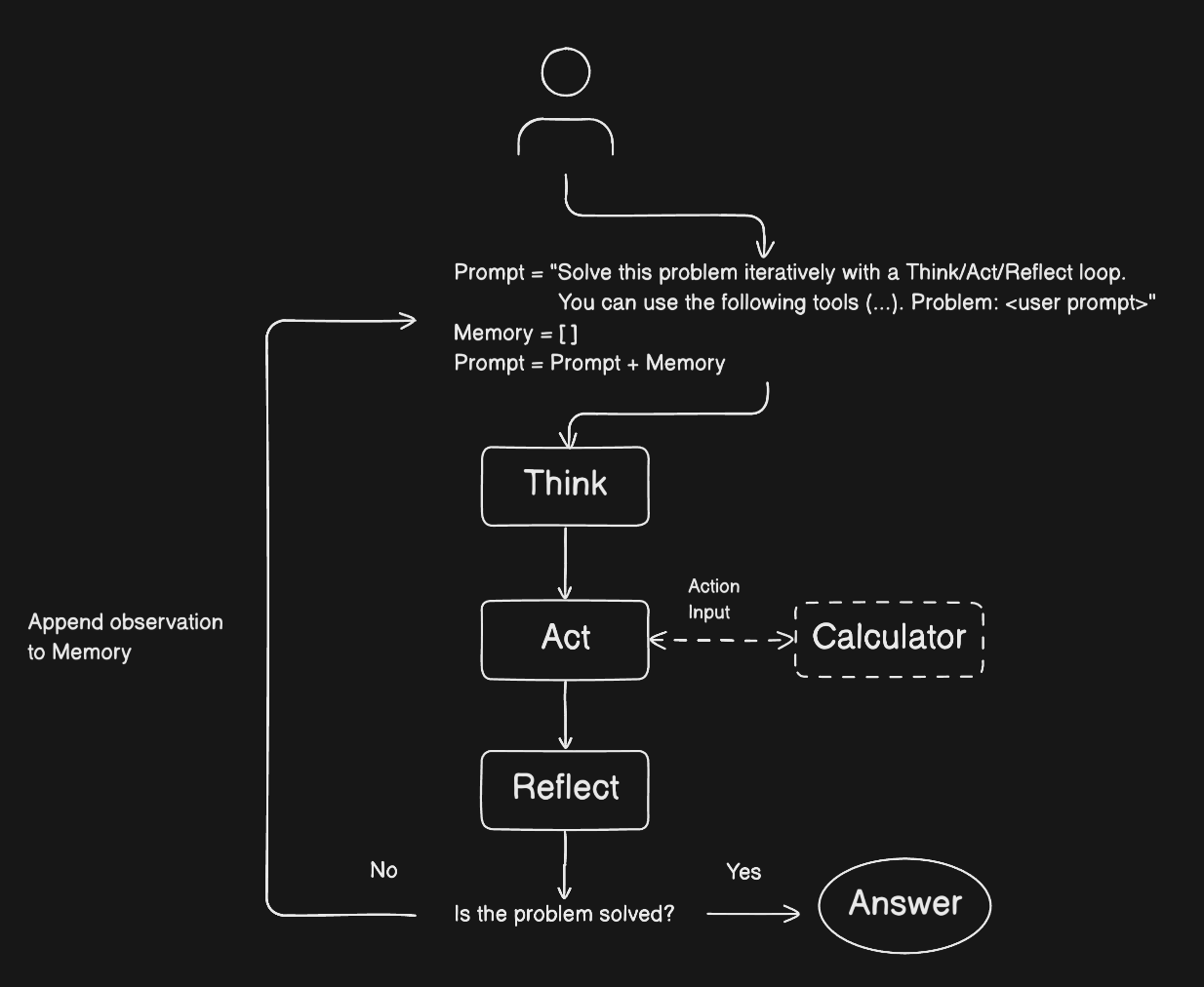
Import the required libraries
from transformers import AutoTokenizer, AutoModelForCausalLM, MistralForCausalLM, StoppingCriteria, StoppingCriteriaList
import json
import re
import torch

device = "cuda" if torch.cuda.is_available() else "cpu"
print("Using device:", device)
Using device: cpu
Define the language model and tokenizer.
We will use Qwen
If using Colab, you will probably need a Colab subscription to reliably access a GPU on which to load and run the LLM. You can cancel the subscription at the end of the course. If you already pay for credits for a different model (ChatGPT, Claude, Gemini, etc.) and plan to use that for the course, you won’t need to pay for Colab Pro to run a model locally.
model_name = "Qwen/Qwen2.5-3B-Instruct"tokenizer = AutoTokenizer.from_pretrained(model_name)
# the tokenizer is built within the model, so you always use .from_pretrained(model_name)Warning: You are sending unauthenticated requests to the HF Hub. Please set a HF_TOKEN to enable higher rate limits and faster downloads.
dtype = torch.float16 if device == "cuda" else torch.float32
# use dtype, to load model weights in FP16 instead of FP32 for less powerful processors,halves memory, often faster.
The following cell will load the language model. When running a model locally, you are balancing a tradeoff between model size/capability and available resources. Before running this cell, click on “RAM Disk” in the top-right corner and watch the GPU RAM spike up when loading checkpoint shards (the model parameters).
# this may take a few minutes to load the model depending on your runtime
# you may ignore the accelerate warning

if device == "cuda":
    model = AutoModelForCausalLM.from_pretrained(
        model_name,
        dtype=dtype,
        device_map="auto",
        low_cpu_mem_usage=True
    )
else:
    model = AutoModelForCausalLM.from_pretrained(
        model_name,
        dtype=dtype,
        low_cpu_mem_usage=True,
).to(device)Define the calculator tool function
Our agent needs tools to interact with the world. We’ll start with a simple calculator.
We will first define which operations are allowed.
import math

# define operations calculator will be allowed to execute
ALLOWED_NAMES = {
    name: value
    for name, value in math.__dict__.items()
    if not name.startswith("__")
}
list(ALLOWED_NAMES.keys())[:10]
['acos',
 'acosh',
 'asin',
 'asinh',
 'atan',
 'atan2',
 'atanh',
 'cbrt',
 'ceil',
'copysign']len(ALLOWED_NAMES)61def calculator(expression: str) -> str:
try:
result = eval(
expression,
{"__builtins__": {}}, #removes python builtin functions from execution
ALLOWED_NAMES #specifies the only operations allowed
)
return f"The result is {result}"
except Exception as e:
return f"Error in calculation: {e}"
⚠️ Naïvely using eval() in an agent tool is extremely dangerous.
When an agent has access to a tool that calls eval(expression), the code being evaluated is no longer “just user input” — it is agent-generated code. If the tool executes eval() without restrictions, the agent is effectively granted the full power of the Python runtime, including file access, imports, and system commands (e.g., open("secret.txt", "r") or import os). This creates a critical security risk: a single tool call can unintentionally (or maliciously) escape its intended purpose. For an agent tool to be safe, we must strictly control which names and capabilities the agent is allowed to use during evaluation, rather than trusting the agent’s outputs.
Define the calculator tool for the Agent
We describe our tools using a structured format that the LLM can understand, the OpenAI function calling format (generally referred to as “tool calling”) that Hugging Face Transformers expects (quite standard).
The key parts are:
name: “calculator”
description: A clear description explaining what the calculator does and what expressions it can evaluate
parameters: This should follow JSON Schema format, defining:
type: “object”.
properties: describing the parameters (in our case only the expression parameter)
required: listing which parameters are mandatory
additionalProperties: prevent additional parameters
The parameters field uses JSON Schema to describe what arguments the function accepts. For your calculator, it takes a single string parameter called expression that represents the mathematical expression to evaluate.
tools = [{
    "type": "function",
    "function": {
        "name": "calculator",
        "description": "Evaluates a mathematical expression and returns the result. Supports basic arithmetic operations like addition (+), subtraction (-), multiplication (*), division (/), and exponentiation (**).",
        "parameters": {
            "type": "object",
            "properties": {
                "expression": {
                    "type": "string",
                    "description": "The mathematical expression to evaluate, e.g., '2 + 2' or '(10 * 5) / 2'"
                }
            },
            "required": ["expression"],
            "additionalProperties": False
        }
    }
}]
The OpenAI tool definition format serves as a contract between the LLM and the agent code.
For the LLM: It’s documentation - the LLM reads the JSON in the prompt to understand what tools exist and how to call them.
For the agent code: It’s a schema - we use the same JSON to know which Python functions to execute and what parameters they expect.
Security note:
Although a structured schema constrains the function’s arguments, the model can still output malformed JSON or hallucinated parameters unless you validate. OpenAI explicitly notes you must validate tool arguments before calling your function.
Define the ReAct Agent as a Python class
Our agent needs to maintain state: the model, tokenizer, and available tools. We’ll define the class structure and initialization here.
# Define a global tool registry
TOOL_REGISTRY = {
    "calculator": calculator
}

class ReActAgent:
    def __init__(self, model, tokenizer, tools):
        self.model = model
        self.tokenizer = tokenizer
        self.tools = tools
        self.tool_names = [tool["function"]["name"] for tool in tools]

        # Automatically map tool names to functions from registry
        self.tool_functions = {
            name: TOOL_REGISTRY[name]
            for name in self.tool_names
            if name in TOOL_REGISTRY
        }
We need TOOL_REGISTRY separately because JSON can only contain data (strings, numbers), not executable Python functions. So we maintain a mapping from tool names (strings in JSON) to actual Python function objects.
Define the ReAct system prompt to guie the LLM into generating structured reasoning and use the avilable tools.
available_ops = ", ".join(sorted(ALLOWED_NAMES.keys()))
available_ops
'acos, acosh, asin, asinh, atan, atan2, atanh, cbrt, ceil, comb, copysign, cos, cosh, degrees, dist, e, erf, erfc, exp, exp2, expm1, fabs, factorial, floor, fmod, frexp, fsum, gamma, gcd, hypot, inf, isclose, isfinite, isinf, isnan, isqrt, lcm, ldexp, lgamma, log, log10, log1p, log2, modf, nan, nextafter, perm, pi, pow, prod, radians, remainder, sin, sinh, sqrt, sumprod, tan, tanh, tau, trunc, ulp'def format_prompt(self, question, max_iterations=10):
"""Construct the exact prompt template with tool descriptions"""
import json
tool_names_str = ", ".join(self.tool_names)
tools_json = json.dumps(self.tools, indent=2)
available_ops = ", ".join(sorted(ALLOWED_NAMES.keys()))
system_prompt = f"""You are a ReAct agent capable of using tools to answer questions.
You will think through each problem step-by-step, use tools as necessary, and provide accurate answers.
You have access to the following tools:
{tools_json}
You must always use the tools for evaluating mathematical operations. If needed, you may break down a problem into multiple
tool calls to evaluate the final answer.
When a problem requires multiple steps (multiple tool calls), do the following:
1. make a plan
2. at each step, review the plan and make sure you are on track
3. execute all the steps before you answer the question.
IMPORTANT CALCULATOR CONSTRAINTS:
- The calculator can ONLY use these operations: {available_ops}
- The calculator uses Python's math module - use functions like sqrt(x), pow(x,y), sin(x), etc.
- Expression examples: "sqrt(144)", "pow(2, 3)", "sin(pi/2)"
- For rounding: If a result has more than 2 decimal places, round it using this expression: "floor(result * 100 + 0.5) / 100"
Do not use round(), you can't execute Python builtins
Example: To round 3.14159 to 2 decimals, use "floor(3.14159 * 100 + 0.5) / 100" which gives 3.14
Use the tools by specifying a json blob with an 'action' key (tool name) and an 'action_input' key (the tool input, matching the parameters schema above).
Valid actions: {tool_names_str}
The $JSON_BLOB must only contain a SINGLE action and must be formatted as markdown. Do NOT return a list of multiple actions.
Example:
Action:
```json
{{
"action": "calculator",
"action_input": "5+2"
}}
```
ALWAYS use the following format:
Question: the input question you must answer
Thought: you should always think about what action to take. Only one action at a time.
Action:
```json
{{JSON_BLOB}}
```
Observation: the result of the action
This Thought/Action/Observation cycle can repeat up to {max_iterations} times. Take several steps as needed, but use your iterations wisely.
You must always end your output with the following format:
Thought: I now know the final answer
Final Answer: the final answer to the original input question
Now begin! Reminder to ALWAYS use the exact characters 'Final Answer:' when you provide a definitive answer.
Question: {question}"""
return system_prompt
# Attach the method to the class
ReActAgent.format_prompt = format_prompt#test
agent = ReActAgent(model, tokenizer, tools)
prompt = agent.format_prompt(question="What is the square root of 25?")
print(prompt)You are a ReAct agent capable of using tools to answer questions.
You will think through each problem step-by-step, use tools as necessary, and provide accurate answers.
You have access to the following tools:
[
{
"type": "function",
"function": {
"name": "calculator",
"description": "Evaluates a mathematical expression and returns the result. Supports basic arithmetic operations like addition (+), subtraction (-), multiplication (*), division (/), and exponentiation (**).",
"parameters": {
"type": "object",
"properties": {
"expression": {
"type": "string",
"description": "The mathematical expression to evaluate, e.g., '2 + 2' or '(10 * 5) / 2'"
}
},
"required": [
"expression"
],
"additionalProperties": false
}
}
}
]
You must always use the tools for evaluating mathematical operations. If needed, you may break down a problem into multiple
tool calls to evaluate the final answer.
When a problem requires multiple steps (multiple tool calls), do the following:
1. make a plan
2. at each step, review the plan and make sure you are on track
3. execute all the steps before you answer the question.
IMPORTANT CALCULATOR CONSTRAINTS:
- The calculator can ONLY use these operations: acos, acosh, asin, asinh, atan, atan2, atanh, cbrt, ceil, comb, copysign, cos, cosh, degrees, dist, e, erf, erfc, exp, exp2, expm1, fabs, factorial, floor, fmod, frexp, fsum, gamma, gcd, hypot, inf, isclose, isfinite, isinf, isnan, isqrt, lcm, ldexp, lgamma, log, log10, log1p, log2, modf, nan, nextafter, perm, pi, pow, prod, radians, remainder, sin, sinh, sqrt, sumprod, tan, tanh, tau, trunc, ulp
- The calculator uses Python's math module - use functions like sqrt(x), pow(x,y), sin(x), etc.
- Expression examples: "sqrt(144)", "pow(2, 3)", "sin(pi/2)"
- For rounding: If a result has more than 2 decimal places, round it using this expression: "floor(result * 100 + 0.5) / 100"
Do not use round(), you can't execute Python builtins
Example: To round 3.14159 to 2 decimals, use "floor(3.14159 * 100 + 0.5) / 100" which gives 3.14
Use the tools by specifying a json blob with an 'action' key (tool name) and an 'action_input' key (the tool input, matching the parameters schema above).
Valid actions: calculator
The $JSON_BLOB must only contain a SINGLE action and must be formatted as markdown. Do NOT return a list of multiple actions.
Example:
Action:
```json
{
"action": "calculator",
"action_input": "5+2"
}
```
ALWAYS use the following format:
Question: the input question you must answer
Thought: you should always think about what action to take. Only one action at a time.
Action:
```json
{JSON_BLOB}
```
Observation: the result of the action
This Thought/Action/Observation cycle can repeat up to 10 times. Take several steps as needed, but use your iterations wisely.
You must always end your output with the following format:
Thought: I now know the final answer
Final Answer: the final answer to the original input question
Now begin! Reminder to ALWAYS use the exact characters 'Final Answer:' when you provide a definitive answer.
Question: What is the square root of 25?
Example
When presented with the question “What is the result of 5 + 2?” we will have the following:
ReAct Reasoning/Thinking
Question: What is the result of 5 + 2?
Thought: To solve this, I need to calculate the value of 5 + 2 using the calculator tool.
Generating the action
The agent specifies the action in JSON (formatted as markdown):
Action:
```json
{
    "action": "calculator",
    "action_input": "5+2"
}
```
Generating the final response
Observation: The result is 7
Thought: I now know the final answer.
Final Answer: 7
Define Stopping Criteria*
To prevent the model from generating the answer without using the tools, we must define a stop criteria. In this case, we want to stop generating right after the model generates the action. Following our ReAct logic, a simple approach is to stop generation right after the model generates the "Observation: " sequence generated right after the action.
class StopOnObservation(StoppingCriteria):
    def __init__(self, target_sequence, prompt, tokenizer):
        """
        Stop generation when target_sequence (e.g., 'Observation:') appears in generated text.

        Args:
            target_sequence: String to watch for (e.g., 'Observation:')
            prompt: The original prompt (to exclude it from checking)
            tokenizer: Tokenizer to decode tokens
        """
        self.target_sequence = target_sequence
        self.prompt = prompt
        self.prompt_length = len(tokenizer.encode(prompt, add_special_tokens=True))
        self.tokenizer = tokenizer

    def __call__(self, input_ids, scores, **kwargs):
        # Get only the tokens AFTER the prompt (the newly generated tokens)
        generated_token_ids = input_ids[0][self.prompt_length:]

        # Decode only the new tokens
        new_text = self.tokenizer.decode(generated_token_ids, skip_special_tokens=True)

        # Check if target sequence appears in the newly generated text only
        if self.target_sequence in new_text:
            return True

        return False
# Test
stop_criteria = StopOnObservation(
target_sequence="Observation:",
prompt=prompt,
tokenizer=tokenizer
)
# Inspect the object
print("Target sequence:", stop_criteria.target_sequence)
print("Prompt length:", len(stop_criteria.prompt))
print("Tokenizer EOS token:", stop_criteria.tokenizer.eos_token)Target sequence: Observation:
Prompt length: 3259
Tokenizer EOS token: <|im_end|>
Define the model respone
Now we implement the text generation (a single LLM request) with stopping criteria
def generate_response(self, prompt, stopping_criteria):
    """Generate a response from the model given a prompt and stopping criteria"""
    inputs = self.tokenizer(prompt, return_tensors="pt") #return_tensors="pt" returns the tokenized output as PyTorch tensors
    input_ids = inputs.input_ids.to(device) # move the tensor to the specified device (CPU or GPU)
    attention_mask = inputs.attention_mask.to(device) # move the attention mask tensor to the specified device

    outputs = self.model.generate(
        input_ids,
        attention_mask=attention_mask,
        max_new_tokens=750,
        temperature=0.8,
        pad_token_id=self.tokenizer.eos_token_id,# pad (fill shorter sequences) with end-of-string token
        repetition_penalty=1.1,
        do_sample=True, #sample the next token from the probability distribution
        stopping_criteria=stopping_criteria
    )

    # Decode the FULL output
    full_text = self.tokenizer.decode(outputs[0], skip_special_tokens=True)

    # Remove the prompt
    if full_text.startswith(prompt):
        generated_text = full_text[len(prompt):].strip()
    else:
        # Fallback: The prompt might not match exactly due to tokenization
        # In this case, warn and return what we can
        print("WARNING: Generated text doesn't start with prompt - returning full output")
        print(f"Prompt ends with: ...{prompt[-100:]}")
        print(f"Output starts with: {full_text[:100]}...")
        generated_text = full_text

    return generated_text

# Attach the method to the class
ReActAgent.generate_response = generate_response
# Test - this may take a few minutes on colab, depending on the model used
response = agent.generate_response(prompt, stopping_criteria=StoppingCriteriaList([stop_criteria]))
responseDefine action extraction
def extract_action(self, response):
    """Extract the JSON blob related to an action from the model's response."""

    # Try 1: Look for JSON with markdown code fence
    match = re.search(
        r'```json\s*(\{.*?\})\s*```',
        response,
        re.DOTALL
    )

    if match:
        json_str = match.group(1).strip()
        try:
            return json.loads(json_str)
        except json.JSONDecodeError as e:
            print(f"JSON parsing error: {e}")
            print(f"Malformed JSON: {json_str}")
            return None

    # Try 2: Look for JSON object with "action" and "action_input" keys (no markdown fence)
    match = re.search(
        r'\{[^{}]*"action"[^{}]*"action_input"[^{}]*\}',
        response,
        re.DOTALL
    )

    if match:
        json_str = match.group(0).strip()
        try:
            return json.loads(json_str)
        except json.JSONDecodeError as e:
            print(f"JSON parsing error: {e}")
            print(f"Malformed JSON: {json_str}")
            return None

    return None

# Attach the method to the class
ReActAgent.extract_action = extract_action
# Test
action = extract_action(agent, response)
action{'action': 'calculator', 'action_input': 'sqrt(25)'}Define the ReAct Workflow
We will add some output to observe the
Agent’s reasoning, good for testing.
Some, but not all, thinking output may be desirable for users.
def interact(self, question, max_iterations=10):
    """Answer the question iteratively using the structured ReAct process"""

    print(f"Question: {question}\n")
    print("="*60)


    # Generate the initial prompt
    initial_prompt = self.format_prompt(question, max_iterations)
    prompt = initial_prompt
    print(f"\nInitial prompt contains {len(prompt)} characters")
    print(f"Max iterations: {max_iterations}\n")

    # The ReAct loop
    iteration = 0

    while iteration < max_iterations:
        iteration += 1

        print(f"\nITERATION {iteration}")
        print("-"*60)


        # Check if we should use stopping criteria
        # Only check the conversation history (not the initial system prompt)
        conversation_history = prompt[len(initial_prompt):]

        if "I now know the final answer" in conversation_history or "Final Answer:" in conversation_history:
            # Final answer mode - let the model complete naturally without stopping
            print("Final answer mode detected - disabling stop criteria")
            stopping_criteria_list = StoppingCriteriaList([])
        else:
            # Normal ReAct iteration - stop at "Observation:"
            stopping_criteria = StopOnObservation(
                target_sequence="Observation:",
                prompt=prompt,
                tokenizer=self.tokenizer
            )
            stopping_criteria_list = StoppingCriteriaList([stopping_criteria])

        print("Generating model response...")
        new_content = self.generate_response(
            prompt,
            stopping_criteria=stopping_criteria_list
        )

        print("\nModel Output:")
        print(new_content)

        # Check if we have a final answer
        if "Final Answer:" in new_content:
            final_answer_match = re.search(r"Final Answer:\s*(.+)", new_content, re.DOTALL)
            if final_answer_match:
                final_answer = final_answer_match.group(1).strip()
                print(f"\n{'='*60}")
                print("AGENT COMPLETED SUCCESSFULLY")
                print(f"{'='*60}\n")
                return final_answer
            else:
                # "Final Answer:" found but nothing after it
                print("Warning: 'Final Answer:' found but no answer provided")
                print("Continuing to next iteration...")
                continue

        # Check if we have an action to execute
        if "Action:" in new_content:
            print("\nExtracting and executing action...")
            action_json = self.extract_action(new_content)

            if action_json is None:
                print("Failed to parse action")
                return "I am unable to answer the question (failed to parse action)."

            tool_name = action_json.get("action")
            tool_input = action_json.get("action_input")

            print(f"   Tool: {tool_name}")
            print(f"   Input: {tool_input}")

            if tool_name not in self.tool_names:
                print(f"Unknown tool: {tool_name}")
                return f"I am unable to answer the question (unknown tool: {tool_name})."

            # Execute the tool
            if tool_name in self.tool_functions:
                tool_func = self.tool_functions[tool_name]

                # Handle both dict and string input formats
                # The model should provide a dict, but sometimes provides a string directly
                if isinstance(tool_input, dict):
                    # Correct format: {"expression": "..."}
                    result = tool_func(**tool_input)
                elif isinstance(tool_input, str):
                    # Fallback: model provided string directly
                    # Assume the tool takes 'expression' as the parameter name
                    result = tool_func(expression=tool_input)
                else:
                    result = f"Error: Unexpected tool_input type: {type(tool_input)}"

                print(f"\nTool Result: {result}")
            else:
                result = f"Error: Tool function '{tool_name}' not found"
                print(f"{result}")

            # MEMORY MECHANISM: Append the observation result to the prompt
            # This is how the agent maintains context across iterations.
            # The prompt grows to include all previous thoughts, actions, and observations,
            # allowing the model to see the full reasoning chain and build on previous results.
            prompt += f"\n{new_content} {result}\n"

            print(f"\nUpdated context (prompt now contains {len(prompt)} characters)")
            print("The model will see this history in the next iteration.\n")
        else:
            print("No action or final answer found")
            return "I am unable to answer the question (no action or final answer found)."

    print(f"\n{'='*60}")
    print("MAX ITERATIONS REACHED")
    print(f"{'='*60}\n")
    return "I am unable to answer the question (max iterations reached)."

# Attach the method to the class
ReActAgent.interact = interactTest
# Test 1
agent = ReActAgent(model, tokenizer, tools)
answer = agent.interact("What is the square root of 144?")
print(f"Final Answer: {answer}")
Question: What is the square root of 144?

============================================================

Initial prompt contains 3260 characters
Max iterations: 10


ITERATION 1
------------------------------------------------------------
Generating model response...

Model Output:
Let's start by determining the square root of 144 using the provided mathematical operation capabilities.
Thought: We need to calculate the square root of 144. This falls under the scope of the `calculator` function that we can utilize. Since there's no direct square root function in our available set of functions, we'll rely on taking the exponential of 1/2 power, which is equivalent to finding the square root.
Action:
```json
{"action": "calculator", "action_input": "exp(1/2*log(144))"}
```
Observation:

Extracting and executing action...
   Tool: calculator
   Input: exp(1/2*log(144))

Tool Result: The result is 12.0

Updated context (prompt now contains 3791 characters)
The model will see this history in the next iteration.


ITERATION 2
------------------------------------------------------------
Generating model response...

Model Output:
Thought: I now know the final answer
Final Answer: 12.0

============================================================
AGENT COMPLETED SUCCESSFULLY
============================================================

Final Answer: 12.0
# Test 2
agent = ReActAgent(model, tokenizer, tools)
answer = agent.interact("What is (12 + 8) * 5 / 2?")
print(f"Final Answer: {answer}")
Question: What is (12 + 8) * 5 / 2?

============================================================

Initial prompt contains 3254 characters
Max iterations: 10


ITERATION 1
------------------------------------------------------------
Generating model response...

Model Output:
Let's start by breaking down the given operation and calculate it step-by-step.
Thought: We need to first perform the addition inside the parentheses and then proceed with the multiplication and division. This calculation involves multiple operations so we'll use the calculator function in a sequential manner.
Action:
```json
{"action": "calculator", "action_input": "(12 + 8) * 5 / 2"}
```
Observation:

Extracting and executing action...
   Tool: calculator
   Input: (12 + 8) * 5 / 2

Tool Result: The result is 50.0

Updated context (prompt now contains 3680 characters)
The model will see this history in the next iteration.


ITERATION 2
------------------------------------------------------------
Generating model response...

Model Output:
Thought: I now know the final answer
Final Answer: 50.0

============================================================
AGENT COMPLETED SUCCESSFULLY
============================================================

Final Answer: 50.0
# Test 3
agent = ReActAgent(model, tokenizer, tools)
answer = agent.interact("What is the square root of (10 + 8) * 5 / 2?")
print(f"Final Answer: {answer}")
Question: What is the square root of (10 + 8) * 5 / 2?
============================================================
Initial prompt contains 3273 characters
Max iterations: 10
ITERATION 1
------------------------------------------------------------
Generating model response...
Model Output:
Round the result to two decimal places if necessary.
Thought: First, I need to calculate the value inside the parentheses (10 + 8). Then multiply that by 5. Afterward, divide the result by 2. Finally, find the square root of that number. Since the operation might produce results needing rounding to two decimal places, I'll apply the provided method after finding the square root.
Action:
```json
{"action": "calculator", "action_input": "(10 + 8) * 5 / 2"}
```
Observation:
Extracting and executing action...
Tool: calculator
Input: (10 + 8) * 5 / 2
Tool Result: The result is 45.0
Updated context (prompt now contains 3769 characters)
The model will see this history in the next iteration.
ITERATION 2
------------------------------------------------------------
Generating model response...
Model Output:
Thought: Now I've calculated that part of the expression. Next, I need to find the square root of 45.0. Once obtained, I will round it according to the instructions given.
Action:
```json
{"action": "calculator", "action_input": "sqrt(45.0)"}
```
Observation:
Extracting and executing action...
Tool: calculator
Input: sqrt(45.0)
Tool Result: The result is 6.708203932499369
Updated context (prompt now contains 4062 characters)
The model will see this history in the next iteration.
ITERATION 3
------------------------------------------------------------
Generating model response...
Model Output:
Thought: I now know the final answer
Final Answer: 6.71
============================================================
AGENT COMPLETED SUCCESSFULLY
============================================================
Final Answer: 6.71
Adjustments fo smaller model:
Explicitly tell it it can break down a problem into multiple tool calls
Tell it to always use tools to answer mathematical expressions, never to evaluate on its own.
Allow fo the possibility that the Action json is not written in markdwon
Your turn!
Try adding more tools and test!
Some tool ideas may be:
Random-number generator
Date calculator
Metric converter
And some test prompts:
I’m running 5 km tomorrow. How many meters is that, and what’s 10% of that distance?
I have a deadline 60 days away. What’s the date, and how many weeks do I have to prepare?
Pick a random temperature between freezing and boiling water in celsius, then tell me what it is in fahrenheit